






Centralized resource scheduling fixes the problem that shows up on almost every project-based team sooner or later: the same skilled person getting claimed by two projects at once.
Consider a 150-person engineering firm running eleven active projects, eleven project managers, and one shared bench of twenty senior engineers. On Tuesday morning, three of these managers each pencil in the same lead structural engineer for the week. None of them is being careless. Each one is working from their own project plan, and none of these plans show what they have already committed to elsewhere. By Friday, two of the three projects had slipped.
Ask leadership what went wrong, and the answer will probably be: ‘we need more engineers’. On the surface, it looks like understaffing, but the firm actually has enough people. What it lacks is a single view of where these people are already committed. This is the daily reality of decentralized scheduling. Not one dramatic failure, but dozens of small, invisible resource conflicts stacking up across the organization until they surface as missed deadlines, burned-out performers, and margins that never hit target.
Chapter 1 laid out what resource scheduling is and the mechanics that keep the project on track. What follows takes this discipline organization-wide: what changes once scheduling runs within one shared system, what it costs to keep putting the shift off, and the sequence that makes it happen without stalling work already in motion. It also looks at where the shift tends to go wrong, since good intentions alone rarely survive contact with real organizational politics.
Most teams do not end up scheduling in silos on purpose. It happens because it was the fastest option back then. A department needed a system, someone built a spreadsheet, and it worked well enough that nobody circled back to fix it. The problem is that this ‘worked well enough’ quietly compounds into real cost. Here is where this cost usually starts.
Every manager is being measured on something, and it is rarely ‘how well you share your best people with other teams.’ When incentives reward keeping talent close rather than deploying it where it is needed most, departments end up hoarding resources (even when they don’t mean it). This is not stubbornness. It is a rational response to how performance is getting scored, and it rarely gets fixed by asking managers to be more generous. It gets fixed by changing what they are measured on.
When a scheduling conflict comes up, someone has to decide who gets the resource. If the answer is ‘whoever pushes hardest’ or ‘whoever escalates first,’ there is no decision-making structure in place. It is just a negotiation cycle that repeats every week. Clear ownership of who resolves competing demands is one of the simplest fixes available, and one of the most commonly skipped, usually because nobody wants to be the person who says no to a peer.
This is the structural half of the problem. Teams get good at their own function, and this specialization is valuable. But it also means the finance scheduling tool doesn’t talk to the delivery tool, and neither talks to the HR capacity data. The deeper the specialization, the more deliberate an organization has to be about stitching this expertise back together. Specialization and integration don’t happen automatically at the same pace.
Teams take their scheduling cues from the top. If executives treat resource scheduling as each department’s private business, middle managers follow suit, and frontline schedulers do the same. McKinsey’s article on ‘To Centralize or Not To Centralize’ outlines a three-question test for deciding if a function belongs at the center. It also warns of downsides, such as weaker local motivation and added bureaucracy, that must be managed deliberately. Centralization tends to stick only when leadership models it from the top, not just mandates it, which usually means executives changing how they personally request and release resources, not just signing off on a new policy document.
Most organizations are running a project management tool, a separate HR system, a spreadsheet or two, and maybe a calendar app nobody fully trusts. None of them share data automatically, so someone is manually reconciling numbers between systems every week, quietly becoming the most overworked person on the team. The irony is that this reconciliation work rarely shows up on anyone’s job description. Yet it consumes hours that could otherwise go toward the work the schedule was supposed to protect.
Recognizing these patterns is the easy part. The harder part is knowing exactly what an organization is building toward when it fixes them, and that starts with a clear definition of what centralized scheduling actually looks like in practice.
Centralized resource scheduling is managing an organization’s people and equipment through one shared system, rather than letting each department run its own process. It gives every manager the same live view of who is available, when, and at what capacity, so scheduling decisions are based on shared visibility. Three things define a centralized approach:
1. A single source of truth for resource availability, so nobody has to reconcile five spreadsheets to answer one question.
2. Standardized rules for how competing demands get prioritized, so outcomes do not depend on who complains the loudest.
3. Shared accountability for utilization across the whole organization, not just within one department’s walls.
None of these three requires flattening the organization chart or stripping managers of authority over their own teams. They simply require everyone to draw from the same pool of information when making a scheduling decision. It is worth being clear about what centralization is not. It is not one department dictating headcount decisions to every other department. It is also not a single dashboard that replaces judgment with automation. It is closer to a shared operating layer that every team plugs into.
Centralized scheduling is the most established in AEC consultancies juggling dozens of client engagements at once, in healthcare systems coordinating clinical staff across departments and shifts, in construction and architecture firms managing shared equipment and specialized crews across job sites, and in IT organizations, where developers get pulled across multiple product teams within the same sprint cycle.
The common thread is not industry. It is any environment where the same people or equipment are in demand from multiple directions. This describes most growing organizations sooner or later. Understanding what centralization means is one thing. Seeing what it costs an organization when it’s missing is another, and this is where numbers become harder to ignore.
Decentralized scheduling doesn’t announce itself as a problem. It shows up as a dozen small inefficiencies that never got added up in one place. Here is what the math looks like once it is.
Every hour spent traveling between project sites, job walks, and client offices, or waiting on an approval a shared system could have handled in minutes, is an hour paid for without delivery value in return. For construction and architecture teams running several active sites at once, this ‘windshield time’ quietly erodes billable hours every week. Because it spreads across dozens of small trips rather than one visible event, it rarely shows up as a line item anyone questions.
This is one of the clearest costs to point to. Microsoft’s Work Trend Index found that 60% of meetings are unscheduled or ad hoc, scheduled at the moment. This kind of last-minute scrambling is what happens when nobody has a shared view of who is actually free. It is not strategic work. It is time spent fighting tools meant to help, and it falls on the same people who happen to understand how all the disconnected systems fit together.
Without a shared view, some people end up under-booked while others are stretched thin, often on the same team. A clear-eyed view of an organization’s real capacity usually reveals gaps that department heads cannot own, because each one can only see their own slice of the workforce.
Delays and rework caused by scheduling conflicts directly hit the top line. Research on project outcomes in Turkey, published in the IJISPM, found that fewer than half of reviewed projects were completed successfully, with roughly the same share finishing over budget, delayed, or with reduced scope. Every missed deadline is a client conversation organizations would rather not have, and repeated enough, these conversations start affecting contract renewals more than just individual project margins.
When no one has a full view of who is working what hours, which certifications, or under which regulatory constraints, compliance gaps slip through unnoticed until an audit or an incident forces the issue. In regulated industries, this isn’t a minor administrative slip. It can mean fines, license reviews, or a client contract terminated over a paperwork gap that was not detected in time.
Grant Thornton’s 2024 State of Work in America survey found that 51% of workers reported suffering burnout in the past year, a 15-percentage-point jump from the year before. Uneven, invisible workloads directly contribute to this number. The people absorbing it are usually the strongest performers on the team (the ones every project manager wants), and none of them can see that they are already stretched across three other commitments.
Burnout doesn’t stay quiet forever. The people most likely to leave are not the weakest performers. They are the most in-demand ones, pulled into three projects at once because no one else can see they are already at capacity. Losing them tends to cost more than a simple replacement search, since the institutional knowledge and client relationships they carry rarely transfer cleanly to whoever fills the next role.
Once the cost of disconnected scheduling is visible, the next question is practical. The next section covers ‘What does a well-built centralized system actually consist of?’
A centralized system is not one tool or a policy. It is five elements working together, and missing any one of them tends to weaken the rest.
Everyone follows the same rules for requesting resources, flagging conflicts, and escalating decisions. Maintaining consistency here is what keeps the system from collapsing back into ‘whoever asks first,’ and it is usually the pillar organizations skip because it feels like paperwork rather than infrastructure. In practice, it is what keeps the other pillars attached.
Instead of five disconnected tools, a system can hold availability, assignments, and utilization. This is usually the point at which teams start evaluating dedicated resource scheduling software, since spreadsheets can store data but cannot flag conflicts before they occur.
Unified technology is not just a convenience upgrade. It is the difference between discovering a conflict after it has already caused a delay and catching it the moment it is created.
Everyone involved, not just project managers, needs to see how work is distributed across the organization. This matters most once teams start mapping out project workstreams that cut across multiple teams. Visibility is what keeps these handoffs from becoming blind spots.
Visibility also changes behavior on its own. Once a manager can see that a colleague’s team is at capacity, requests are routed more thoughtfully instead of being fired off to whoever answers fastest.
Resource optimization is where the other four pillars pay off. The right skills land on the right work at the right time, with enough buffer built in that one engineer’s sick week does not derail three projects at once. Optimization here is not about squeezing every hour out of every person. It is about distributing demand evenly enough that no single source becomes a point of failure for the whole portfolio.
A centralized system is not something set up once and left alone. Utilization data gets reviewed, priorities get adjusted, and the system is refined as the organization’s demand changes. Organizations that treat it as an ongoing practice tend to catch friction points within weeks. Those who treat it as a one-time project usually rediscover the same problems within a year, only now with more people caught up in them.
These five pillars sound straightforward on paper. Turning them into an actual plan is the harder part, and that is exactly what the next section is about.
An organization doesn’t have to overhaul everything in one weekend. Most successful transitions happen in deliberate stages.
Before anything changes, document how scheduling actually happens across every team (including the informal workarounds nobody talks about in meetings). One cannot fix a system until it is fully mapped. This audit usually surfaces at least one workaround that leadership didn’t know existed, often the very one causing the most repeated conflict.
Pick software designed for this specific job rather than stretching a generic project tool to cover it. For mid-sized firms, the right fit sits between lightweight team tools and heavyweight enterprise suites. This is where resource scheduling solutions like eResource Scheduler come into play, offering one live view of availability instead of a dozen static spreadsheets that go stale the moment someone updates one.
The workflow map from Step 1 works as a simple test here. If a tool cannot handle the way teams request, assign, and track people, it won’t fix the problem the map uncovered.
With the software in place, bring people and equipment from every department into one shared pool. Tag each resource by skill, role, availability, and cost. Use the categories the workflow map surfaced so managers can see the whole bench rather than just their own department’s slice.
This is often where hidden capacity first shows up. One department may have a specialist it rarely books, while another keeps paying contractors for the same skill.
Decide in advance how conflicts will be resolved when two projects need the same person. A clear project prioritization process means decisions are made on criteria agreed to ahead of time, not on whoever emails loudest that day.
Start with one or two departments rather than flipping the switch organization-wide. A smaller rollout catches problems while they are still small and cheap to fix. It also gives the rest of the organization a practical example to point to, not an abstract promise.
Pilot With The Most Willing Team. Not the Biggest Team.It is tempting to roll out centralization in the largest or most visible department first since the savings look biggest on paper. Resist this instinct. Start with the team open to change (even if it is small). Early wins build the internal case needed before expanding to the more skeptical teams.
Once the system is live, regularly track utilization, delay rates, and satisfaction. Centralization is not a launch. It is an ongoing process that keeps getting tuned, and the organizations that skip this step tend to see the same silos quietly reform within a year, but now inside the new system.
Even with a solid plan, resistance shows up somewhere along the way. Every organization that centralizes scheduling runs into some version of obstacles, usually in the first two quarters of the rollout.
None of the roadblocks indicate that the initiative is failing. They indicate that it is touching the parts of the organization that actually need to change. Here is what to expect and how teams typically work through each one.
| Common Roadblock | How to Clear It |
| Resistance to Change | Involve team leads early in designing the new process rather than presenting it as a finalized decision. People resist mandates more than they resist change itself. |
| Low Morale | Be transparent about why the shift is happening and how it benefits the people doing the work, not just the organization’s bottom line. |
| Loss of Local Responsiveness | Keep some decision-making authority at the team level for day-to-day adjustments, reserving central oversight for genuine cross-team conflicts. |
| Bottlenecks | Set clear service-level expectations for how quickly the central team responds to requests, so centralization doesn’t become slower than the old process. |
| Bureaucracy | Keep approval chains as short as possible. The moment a request needs four sign-offs, the very friction that centralization was meant to remove has been recreated. |
| Overwhelmed Central Units | Staff the central scheduling function adequately from the start. Under-resourcing the team meant to fix under-resourcing elsewhere is a common, avoidable mistake. |
| Fragmented Technology Stacks | Prioritize integration over adding new tools. A system that connects to what’s already in use gets adopted faster than one that asks everyone to abandon their existing setup. |
Clearing these roadblocks takes real effort. This naturally raises the question every leadership team eventually asks. Is it actually worth it? The following section lays out the answer in concrete terms.
The benefits of resource scheduling compound when everyone works from a shared picture instead of several disconnected ones.
Assignments get made based on actual, real-time availability. This alone eliminates a huge share of the resource conflicts covered earlier in this chapter. Fewer conflicts also cause fewer emergency reshuffles, a place where the quiet, unbudgeted costs tend to hide.
Every department follows the same process. This makes onboarding new managers faster and makes scheduling decisions far easier to audit and explain. A new hire can understand how resourcing works across the organization in days rather than months of learning each department’s private conventions.
One system means one clean dataset. Questions like ‘which skill sets are consistently in short supply’ are answered with real numbers instead of anecdotes from frustrated project managers. This turns hiring and training decisions into something closer to forecasting than guesswork.
Fewer delays and less rework mean commitments get delivered on time, something every client relationship is ultimately built upon. Clients rarely notice the scheduling system behind the scenes. They notice whether the work shows up when promised.
Better utilization improves the bottom line. Every hour of previously wasted capacity recovered is an hour not paid for twice, whether through overtime, contractor premiums, or a missed billing opportunity.
When workloads are visible and fairly distributed, teams stop absorbing the invisible overload described earlier in this chapter, and retention improves as a result. People tend to stay longer at organizations where capacity is respected, not assumed.
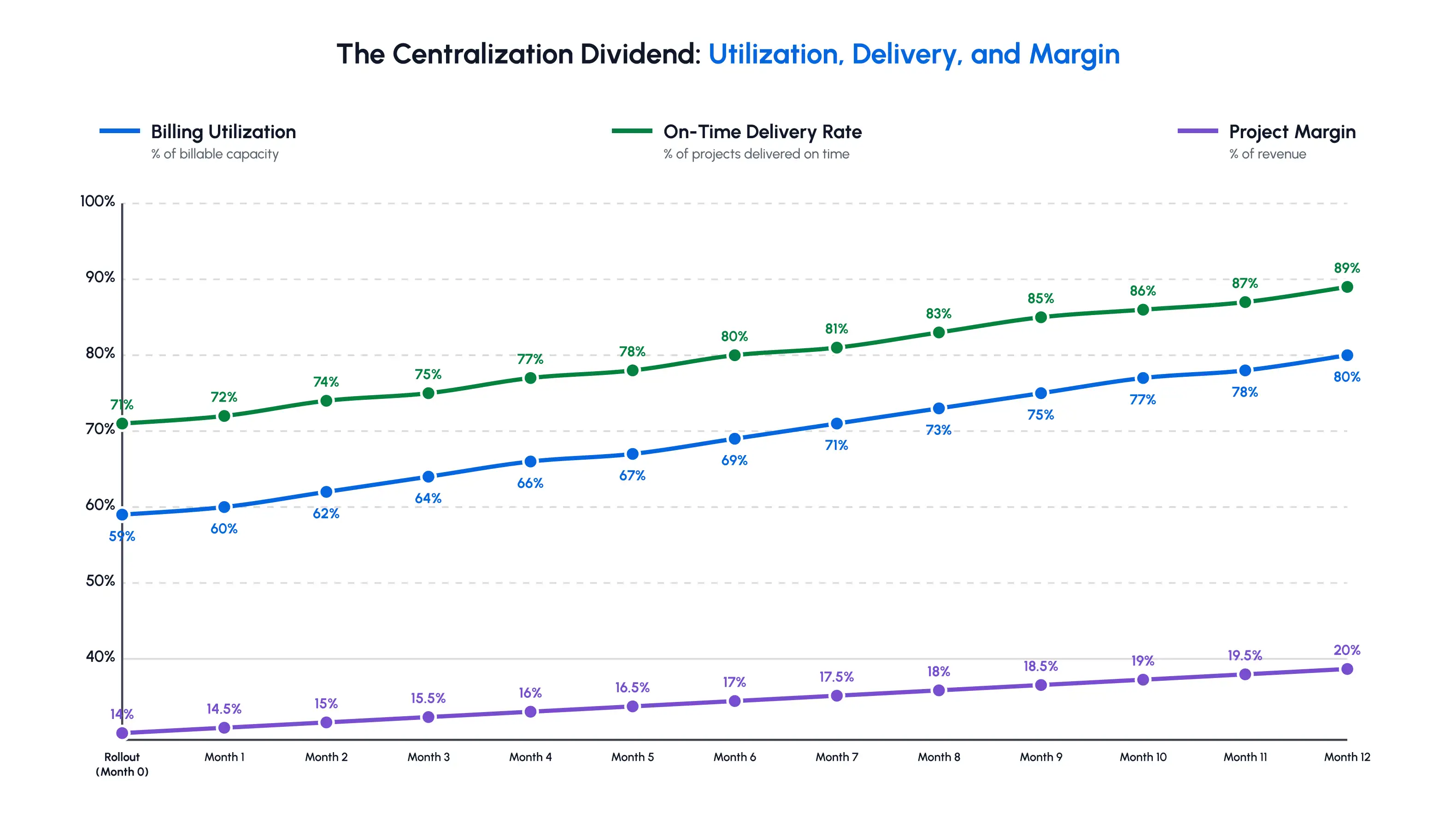
These benefits sound compelling in theory, but they play out differently at an actual organization. Here is what this looked like for one firm that made the shift.
A 280-person engineering consultancy* had four departments. Structural engineering, civil and site engineering, MEP design, and environmental compliance. Each department managed its own scheduling in its own spreadsheet. Senior engineers were routinely double-booked across departments, and no person had a full view of who was actually available in any given week.
Each department head genuinely believed their scheduling was under control, since conflicts only became visible once an engineer was already stretched across two client engagements approved independently, weeks apart, by two different managers who had no reason to check with each other.
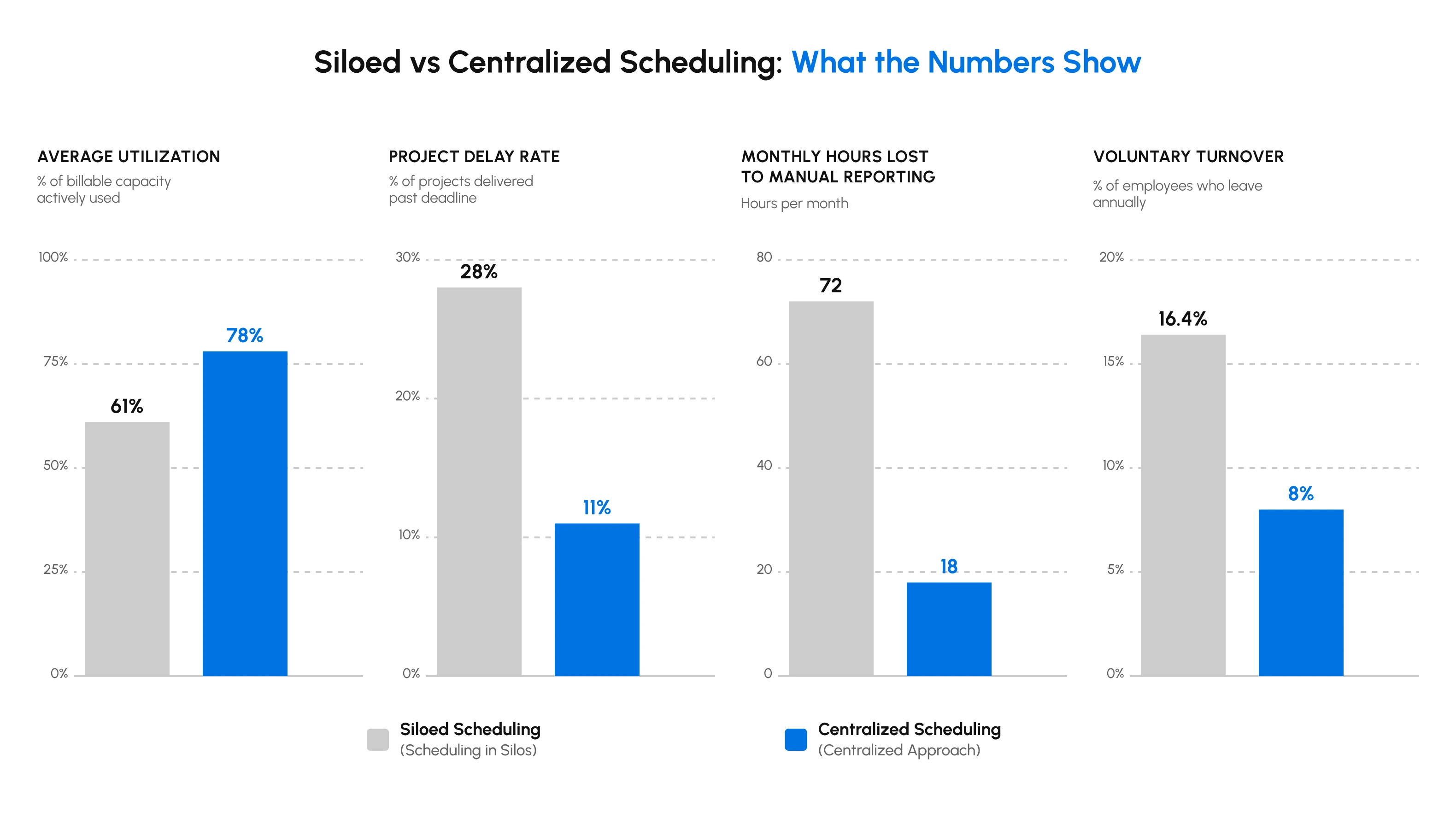
The symptoms were familiar. Senior engineers averaged 2.8 concurrent projects, billable utilization rate was stuck at 61%, and projects ran 19% behind committed timelines on average.
Myth: Centralizing scheduling means losing the specialized, department-level expertise that makes
each team effective.
Reality: This firm’s departments kept full control over how they staff their own client work. What
changed was visibility into availability across departments, not the authority within.
Leadership decided to centralize scheduling across all four groups, building a shared resource pool with a live capacity dashboard and cross-departmental visibility for resolving conflicts. The rollout followed the phased approach, starting with the two departments most eager to change before expanding to the rest.
Within two quarters, the firm’s outcomes shifted measurably:
This shift was not about anyone working harder. It was about giving every department head the same live view of capacity rather than four separate, incomplete ones.
A single success story is useful. But it only proves that centralization can work. What it does not show is what happens when organizations attempt centralization without the infrastructure to support it.
*The firm's name is not shared to protect its privacy.
An organization can have every process, priority framework, and good intention in place, but without the right supporting infrastructure, centralization tends to fall apart quietly.
A shared spreadsheet feels like progress compared to five disconnected ones, but it is still a static document.
Organizations often discover this trap only after several months of confidence in a system that was quietly falling out of date the entire time.
Fact Check: Is a shared spreadsheet ‘centralized’ scheduling? Not in any meaningful sense. Centralization is about live, structured visibility. Not just having one file instead of several. A spreadsheet that five people update manually is still five separate sources of truth, just crammed into one tab.
The real benefits of resource scheduling software show up exactly where spreadsheets fall short. Automatic conflict detection, live updates, and reporting that doesn’t require someone compiling it manually every month. The difference isn’t cosmetic.
Software that flags double-booking the moment it is created prevents the exact kind of delay that shows up two months later as a client escalation. One hesitation that keeps organizations stuck on spreadsheets is the assumption that switching means starting from zero. In practice, most dedicated systems import existing resources and project data directly, so historical assignments and utilization records carry over.
Nobody has to rebuild months or years of scheduling history by hand just to get the new system running. The actual migration effort is cleaning up duplicate or outdated entries that had quietly accumulated across old spreadsheets, not recreating what already existed.
| Spreadsheet Approach | Dedicated Scheduling Software |
| Manual updates are prone to version conflicts | Real-time updates are visible to everyone at once |
| No automatic conflict detection | Flags overlapping assignments before they happen |
| Doesn’t scale well past a handful of users | Built to handle organization-wide usage |
| No audit trail of changes | Full history of who changed what, and when |
| Reporting requires manual compilation | Built-in dashboards and exportable reports |
This gap between static files and live systems is part of why the resource scheduling software market is projected to keep growing through the early 2030s.
Most dedicated scheduling tools fall into two camps: lightweight tools for small teams that outgrow them within a year, or sprawling enterprise systems that take months to configure and need a dedicated administrator to run. Neither fits a 150-person engineering firm, a mid-sized architecture practice, or a 400-person construction consultancy particularly well.
What this size of organization needs is enterprise-grade depth (conflict detection across job sites and departments, cross-team visibility, and audit trails) without the enterprise price tag or months-long rollout. Software designed with this middle ground in mind, eResource Scheduler among them, is where most AEC consultancies and engineering firms end up looking once the decentralized stage stops working.
Once scheduling runs through one shared system, double bookings stop hiding. They still happen, though. A client pulls a deadline forward, a new bid comes through, or two priorities collide in the same week. Seeing the conflict is the first half of the fix.
The next chapter covers the second half: how to stop double bookings at assignment and resolve the ones that slip through without turning every clash into a negotiation.
1. Who should own centralized scheduling in a project-based firm?
A named resource manager, or a small resourcing team within the project management office (PMO), should own centralized scheduling. This owner runs the shared system and deals with conflicts between teams, while department heads still direct daily work within their teams. The role needs clear decision rights from leadership, not just admin access to the system.
2. How long does it take to centralize resource scheduling?
Centralizing resource scheduling typically takes 1 to 6 months, depending on the organization’s size, the complexity of its projects, and how mature its existing data is. Deploying a dedicated platform is usually the quick part. Most of the timeline goes into aligning teams, cleaning up historical data, and changing long-standing scheduling habits.
3. When should a firm not centralize resource scheduling?
A firm gains little from centralizing resource scheduling when its teams never share people or equipment, such as a small practice with one delivery team. Many firms suit a hybrid model instead. They centralize shared specialists, senior staff, and costly equipment, while local managers handle the routine team-level work.
4. What metrics show that centralized resource scheduling is working?
The clearest early signs to tell that centralized resource scheduling is working are faster conflict resolution, live availability records, bookings made further in advance, and lower contractor spend on skills the firm already has. Utilization and on-time delivery improve too, but more slowly. If the early signs stall, teams are not using the system yet.
5. Can centralized resource scheduling work across multiple offices?
Centralized scheduling often works best for multi-office engineering and architecture firms because a specialist sitting idle in one office becomes visible to another that would otherwise hire outside help. The system needs to reflect each office’s local hours, holidays, and leave rules. The priority framework should also state when one office can borrow from another.
 ALL FEATURES INCLUDED