Learn more

If you manage projects for a living, you have probably fallen into at least one of the traps covered here. Not because you are a bad manager, but because these habits are great at disguising themselves as good management on the surface.
An anti-pattern is a habit that feels right in the moment but backfires over time. Handing every urgent task to your best performer feels like trust. Reviewing every step before it moves forward feels like diligence. Both quietly damage your resource management outcomes anyway. Left unchecked, these habits burn out your top people, push back deadlines, and eventually, your team stops trusting the plan.
This blog is not another list of things you already know. It covers three anti-patterns and the why behind them so you can fix the actual cause rather than the symptom sitting in front of you. A solid resource management software setup helps here. But only once you know what you are looking for.
Before we go into detail about the anti-patterns, answer these four questions honestly. You will know which section to read first.
Two ‘YES’ answers or more? You are looking at more than one anti-pattern at once. Keep this in mind. It matters more than it sounds, and the last section of this blog answers why.
Before you can fix an anti-pattern, you need to know what actually separates a pattern from an anti-pattern. Both often look identical from the surface. The difference shows up in what happens next.
| Aspect | Pattern | Anti-Pattern |
| Origin | Grows from a proven, repeatable practice | Grows from a rushed reaction to pressure |
| Trigger | Planned ahead of time | Set off by a deadline or a crisis |
| Short-Term Feel | Reassuring and structured | Reassuring and structured |
| Team's Reaction | Builds trust in the process | Builds quiet resentment over time |
| Long-Term Result | Consistent, repeatable success | Burnout, delays, or hidden risk |
| How it Spreads | Documented and repeated on purpose | Repeated by default, because nobody names it |
| Example | Balancing workload across the whole team | Loading every urgent task onto one person |
A quick way to check yourself: If you had to explain the decision to the whole team out loud, would it still sound reasonable? This single test separates good resource management from bad faster than any framework.
Here are the three habits that wreak resource management plans (more often than not), plus two bonus ones worth watching.
You must have done this at least once. A rush job lands on your desk, and you hand it to the one person who always delivers. It happens once, twice, and after a while becomes a pattern. Until this person is quietly running 3-4 projects in parallel while everyone else has space capacity.
Here is the part that surprises most managers. Your team’s overall utilization number can look perfectly healthy while one person is quietly drowning. Averages hide utilization imbalance. A team at 70 percent utilization on paper can still have someone running at 130 percent. Nobody checks individual rows to determine utilization percentage. They only check the summary at the top/botton and get done with it.
Did You Know?
The habit discussed above has a name: The Hero Complex.
It is what happens when one person keeps saying yes because they are reliable. According to a survey
conducted by Eagle Hill Consulting,
burned-out employees are nearly 3x more likely to say they plan to leave their employers within the
coming year.
Your hero employee might be only a bad week away from being your next resignation letter.
Ericsson used to see the same engineers double-booked across overlapping timelines, with nobody catching it until deadlines collided in the same week. Once the scheduling view made these overlaps visible during planning rather than during the fire drill, reassignments happened before the conflicts.
The deeper fix here has two parts. First, build a workload management process that treats capacity as a hard number (not a feeling). This sees that the same person cannot quietly absorb every urgent request without anyone noticing the pattern forming.
Second, if one name keeps coming up in every urgent-task conversation, treat it as an early warning sign, not a compliment. This is usually where overallocating resources backfires the hardest, in a cost that only shows up months later as a resignation letter. Second, if one name keeps coming up in every urgent task conversation, this is not a coincidence. It is a warning sign worth taking seriously before it becomes a resignation.
Overallocation is a people-capacity problem. The next anti-pattern makes it worse.
When a project starts slipping, the instinct is to throw more hands at it. It rarely works, and there is a name for why. Brook’s Law states that adding manpower to a late project makes it later, because:
This is why a clear work plan built before the project starts matters so much. It shows you who can actually absorb new scope, rather than guessing under deadline pressure, and it turns a gut-feel decision into one you can defend later.
The fix is not more people. It is a schedule that shows you the truth early enough to adjust the plan instead of the headcount. Pini Group ran into this exact gap between planned and actual capacity across project teams. Closing this visibility gap did more for delivery speed than a last-minute headcount addition ever could have. The team could see exactly where the real slack is instead of assuming it existed.

Micromanagement rarely looks like control from the inside. It looks thorough. Every task gets checked. Every decision gets a second opinion. Nothing moves until it clears one more desk.
Gallup’s 2026 State of the Global Workplace report found global engagement fell to just 20% in 2025, costing the world economy an estimated $10 trillion in lost productivity. A lack of autonomy is one of the clearest drivers behind this drop.
Myth: More approval steps catch more mistakes.
Reality: More steps just mean more people to update. You finish a piece, then wait. Someone messages you asking where things stand. You stop to answer, then get back to it, then wait again for the next sign-off. By the end of the day, you worked less than you checked in. The task did not get safer. It just got slower, and so did you.
John Holland tackled micromanagement by giving everyone shared visibility into the plan itself. They replaced a chain of manual approvals with a single view everyone could check without asking a manager at every turn. This change took the manager out of the loop for routine updates, freeing up hours that used to go into status meetings.
Here is the part most advice on anti-patterns skips: Over-allocation and micromanagement usually live on the same team, and they feed each other. The manager who loads every urgent task onto one person is often the same manager who checks the person’s work at every step. This happens because nobody else has been trusted with anything hard enough to build this trust.
Fixing this starts with making the plan itself visible instead of routing everything through approval. This is the whole idea behind shared project workstreams. One view everyone can check, so the status no longer depends on who remembers to ask.
Two more habits deserve a mention, even though they don’t get the top billing.
Using velocity as a productivity KPI turns a planning estimate into a scoreboard, and teams learn to pad the numbers instead of improving output. A suspiciously smooth upward trend usually means padding, not progress. Track throughput and cycle time instead, since both are harder to game. Velocity was only ever meant to help with pipeline forecasting, not to rank people against each other.
Ignoring work-in-progress limits is the process-level twin of over-allocation. Without a cap, work does not disappear; it just piles up sideways. Ten tasks ‘in process’ usually means nine of them actually stalled, waiting on the one thing anyone is actively working on. A visible limit forces the team to finish before they can start something new.
A hard cap only works if paired with project prioritization. Otherwise, your team just gets better at starting the wrong things slower.
Every anti-pattern above has the same blind spot at its core. Nobody had a clear, shared view of who was doing what and how much room they had left. eResource Scheduler closes this gap feature by feature.
| Anti-Pattern | Symptom | eRS Feature that Fixes It | Outcome |
| Over-Allocation | Hidden double-booking, silent burnout risk | Capacity Planning flags anyone booked past 100 percent before you assign the next task | You reassign work before burnout, not after |
| Brook’s Law | Guesswork about who can absorb new scope | Resource Scheduling shows real availability across every active project | You add the right person or push the deadline, instead of guessing |
| Micromanagement | Approval bottlenecks, constant check-ins | Management Reports give a live status view without asking anyone | Status meetings shrink, ownership grows |
| Velocity as a KPI | Inflated estimates, gamed sprint numbers | Timesheets track actual hours against planned hours, not story points | Real throughput data replaces a number teams can game |
| Ignoring WIP Limits | Too many tasks open at once, frequent blockers | Capacity Planning caps active assignments per person | Fewer things in flight, faster finish rate |
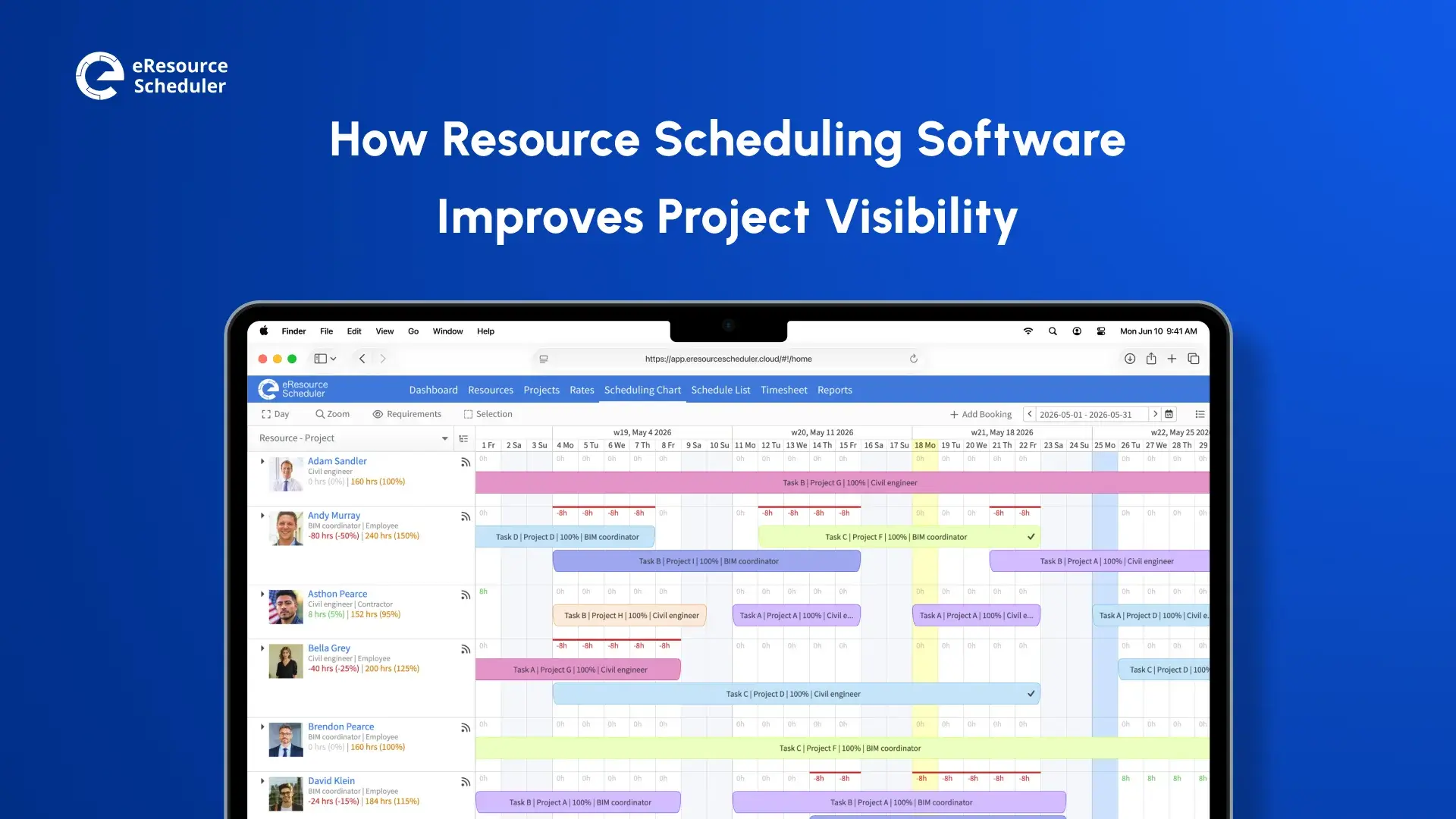
Here is what that looks like on an actual Monday morning. You open the scheduling view, see one name lit up for the third week (in continuation), and move two of their tasks before the stand-up even starts. No spreadsheet reconciliation, no asking around to find out who has room. The data was already sitting there, which is the entire point.
eResource Scheduler does not add another rule. It does not ask for more discipline. It shows the truth first. You see the overload before it happens. You see the bottleneck before it forms. No guessing. No chasing updates. Just the plan, in front of you, every morning.
Most advice on anti-patterns ends with ‘communicate better’ or ‘trust your team’. This sounds right in the moment but changes nothing in the long run because the problem was never a lack of good intentions. Every manager who loads up their best performer or checks every task believes they are doing the responsible thing. Well, they are (given what they can actually see).
This is the real thread connecting above. Over-allocation, late-project panic hires, micromanagement, gamed velocity, and ignored work-in-progress limits are not five separate failures of willpower. They are five symptoms of the same missing piece: a plan that shows the truth before you need it, not after.
Go back to the four questions at the top of this blog. Whichever made you pause the longest is your starting point for the week. Fix the visibility gap behind it, and you will notice one or two of the other four anti-patterns loosen on their own. The same way they tightened together in the first place.

Plan Smarter. Schedule Faster. For Free.
Join thousands already using eResource Scheduler to align teams, time, and tasks seamlessly.
 ALL FEATURES INCLUDED