It is Thursday afternoon. Your construction documents are due in three weeks, and the one project architect who knows the building inside out is still buried in design development on someone else’s job.
Resource management software for architecture firms is built for exactly this moment. It shows who is booked on which project and phase, how much fee is left, and where capacity frees up next month. Studio directors, operations leads, and principals can then fix the clash before it costs a deadline.
The catch is that most tools were built for agencies, not architects. Architecture firms plan work in phases, bill against fixed or percentage fees, and run a dozen small jobs beside a couple of big ones. Software that misses any of this just gives you a prettier version of the spreadsheet you already resent.
Before you compare names, it helps to be clear on what you are actually buying.
Architecture resource management software plans and tracks where your team’s hours go across projects and phases, then checks these plans against actual time and remaining fee. Your project management tool tracks tasks, and your accounting system tracks invoices. Resource management software sits in the gap between them, where fee quietly leaks.

In simple terms, it answers three Monday questions: Who is free? Who is drowning? Will this phase finish within its fee?
Take a 150-person practice running 45 projects. Without a shared view, two interior designers can sit half-booked while a healthcare job eats someone’s weekends, and nobody notices until the overtime report lands. With a shared view, the imbalance shows up on a heatmap on Monday morning while it is still cheap to fix.
As per the AIA report, architecture firm profitability averaged 13.2% of net billings in 2023, with average net billings of $143,000 per employee. Run the math, and this is roughly $18,900 of profit per person per year. A few weeks of unplanned hours on one project can erase it.
So which capabilities actually earn their keep when three deadlines land in the same week?
Four capabilities separate a useful tool from expensive shelfware, and each one maps to a moment where architecture fees usually leak.
Most US projects move through four phases:
Each phase needs a different team. SD leans on a principal and a few designers, CD pulls in production help, and CA needs a licensed architect who can sign off on site. Phase-based resource planning lets you book people against the phase rather than the project as a whole.
A schedule that reads ‘Library: 120 hours this month’ can hide the fact that 90 of these hours are DD rework while the CD has not started. A phase-level view shows the overrun, the phase causing it, and who is stuck there. If a tool cannot hold phases, everything else on this list gets blurrier.
Your best designer is on four feasibility studies, a code review, and a competition entry this week. Is that 38 hours or 52? Architecture firm scheduling software should answer this. Conflict alerts should fire the moment someone is double-booked, not when they quietly work Saturday to catch up.
Problems hide in the small jobs. A 20-hour feasibility study rarely gets a formal plan, yet ten of them can swallow a whole studio. Good resource scheduling software makes every job visible (however small). For architecture project staffing, it also filters people by license, BIM skill, or sector.
Plans are promises, and timesheets show what actually happened. The gap between them is your fee story. When hours flow in through timesheet software tied to the schedule, you can see fee burn by phase every week instead of discovering it at month-end.
Here is what this looks like in practice. A DD phase at 70% of its hours but only 50% complete is a fixable problem in week four. You can trim scope, move a junior designer in, or flag a change order to the client. By week ten, the same numbers mean a write-off. The best tools show this in a view a principal will actually open, with no analyst needed to translate it.
What the Data Says
According to the PMI,
nearly one-third (31%) of complex projects fail to deliver their full intended benefits, more than
twice the rate for projects overall. More than half of all projects now qualify as complex.
Multiphase design work with rotating consultants fits that profile closely.
Architecture capacity planning should include work you have not won yet. Pencil in tentative bookings for pursuits and competitions, and you will see whether a likely win next quarter means a hire, a contractor, or a later start date you should negotiate now.
Hiring won’t bail you out quickly. Architect employment is projected to grow 4% from 2024 to 2034, with about 7,800 openings a year nationwide. This is a thin pool to fish from on short notice.
Forward planning gives you months of warning rather than days, which is the difference between a planned hire and a frantic one. If capacity is your biggest gap, it is worth comparing capacity planning tools alongside the options below.
With these four checks in hand, the tools below get much easier to compare.
There is no single winner. The right pick depends on your headcount, how much financial depth you need, and what is already running in your office. Every tool here does something genuinely well, and each has trade-offs worth knowing before a demo.
We scored each tool against the four checks above and then grouped them by the firm size each serves best.
| Software | Ideal for | Starting Price (Billed Annually) | Best fit |
| eResource Scheduler | Firms of 100 to 5,000 people | From $5/resource/month | Enterprise-grade scheduling, timesheets, and financials at mid-market cost |
| Deltek Vantagepoint | Large, multi-office firms | Custom quote | One ERP for CRM, projects, billing, and accounting |
| Kantata | Large professional services firms | Custom quote | Skills-based matching with 1,200+ connectors |
| Mosaic | Midsize firms | Custom quote | AI workload forecasts on top of existing tools |
| Productive | Multidisciplinary studios | From $10/user/month | Pipeline to invoice in one tool |
| Scoro | Midsize firms | From $17/user/month | Quote-to-invoice with built-in AI |
| BQE CORE | Midsize architecture and engineering firms | Custom quote | Real-time billing KPIs with native accounting |
| Milient | Midsize firms | Custom quote | Dedicated scheduling with integrated timesheets |
| Monograph | Small to midsize studios | From $60/employee/month (billed monthly) | Architecture-native phase budgets and billing |
| Runn | Small studios | From $7/resource seat/month | Capacity and cost forecasting |
| Float | Small studios | From $7/scheduled person/month | Fastest route to a shared visual schedule |
Enterprise Firms
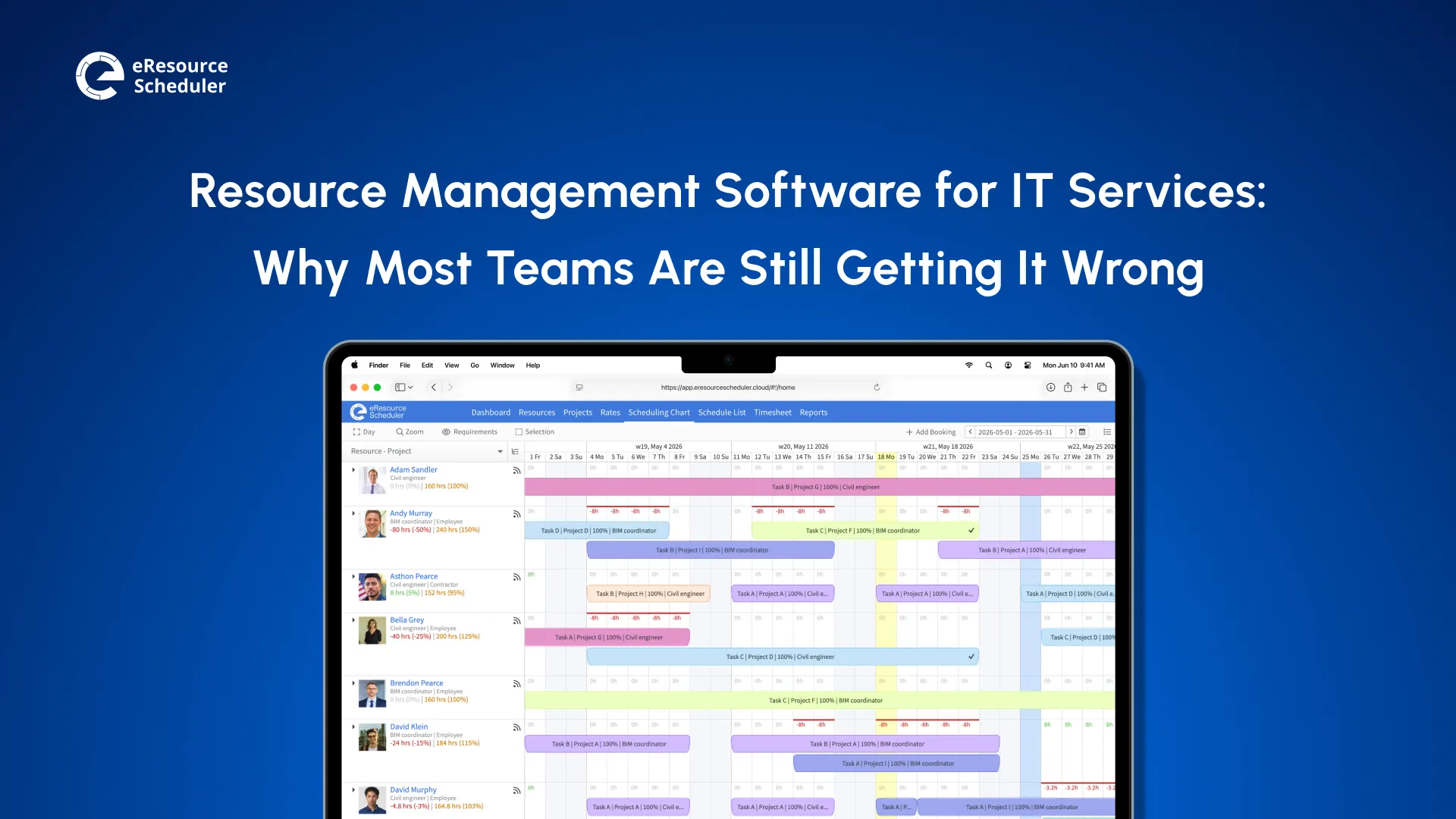
eResource Scheduler is resource management software for project-driven firms of 100 to 5,000 people, ranging from architecture studios to multidisciplinary engineering consultancies. It replaces spreadsheets with one connected view of capacity, schedules, actuals, and financials. More than 850 enterprises across 29+ countries use it, from single-office practices to firms planning across regions.
It is designed for firms that have outgrown spreadsheets but do not want the cost or rollout of an ERP.
Key Features:
One example is Ramboll, a global architecture, engineering, and consultancy company. Its specialists kept getting overbooked across regions while plans lived in spreadsheets and email. After moving planning into eRS, managers work across regional calendars, route skill requests through approvals, and use gap reports to catch overbooking before it reaches delivery.
eResource Scheduler also reaches principals who would rather ask a question than open a report. With eRS MCP, a studio director can ask Claude, ChatGPT, Microsoft Copilot, or other compatible AI tools ‘who is free for CA work in January?’ and get an answer pulled from live schedule data. They can make changes the same way, such as moving a project’s bookings back a week, and every request stays within the person’s existing eRS permissions.
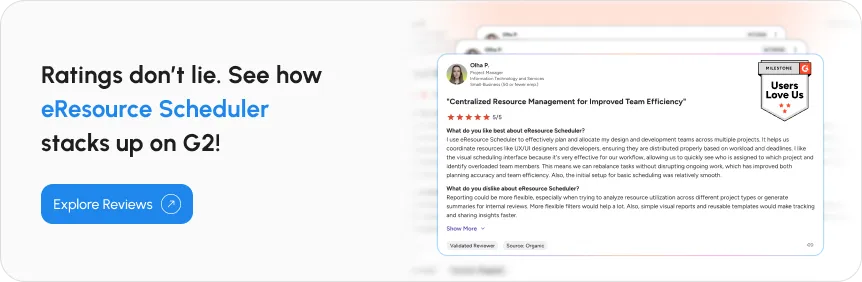
Potential Limitations: eRS focuses on resource planning rather than client invoicing, so billing runs through your existing accounting system, which you can connect through a custom integration. A few G2 reviewers also expressed that they would appreciate more options for customizing reports within eResource Scheduler.
Pricing: Starting at $5 per resource/month (billed annually), with module-based pricing across Scheduling, Scheduling Plus, Timesheets, Financial, and Authentication Plus. Monthly billing is also available.
Demo and Trial: A 30-day free trial with every module, plus live demos.
If you want one system of record from pursuit to closeout, Deltek Vantagepoint is the most established project-based ERP in the space. It keeps CRM, project accounting, and resource planning in one database, which suits larger firms.
Key Features:
Potential Limitations: Reviewers’ most common complaint is that reports are hard to customize without an expert. They also call the interface dated and say it slows down on large databases.
Pricing: Custom quote.
Demo and Trial: Demo available but no free trial.
For large firms that need resource management to plug into an existing tech stack, Kantata offers one PSA system for scoping, resource planning, delivery, and forecasting. It is built for large organizations with a central operations team managing people at scale.
Key Features:
Potential Limitations: Reviewers often call it expensive for smaller teams with a steep learning curve. The scheduler can load slowly on large projects.
Pricing: Custom quote.
Demo and Trial: Demo available but no free trial.
Midsize Firms
For project-based firms that want AI forecasting without abandoning their current tools, Mosaic layers resource management on top of the project and finance software you already use. The software primarily caters to architecture and engineering practices.
Key Features:
Potential Limitations: Team members cannot see projects they are not assigned to, which makes cross-project planning harder. Reviewers also say fixes and feature requests are slow to arrive.
Pricing: Plan-based model with a custom quote for each plan.
Demo and Trial: Demo available but no free trial.
For studios that sell and deliver work like an agency, Productive covers the whole journey from first proposal to final invoice. It is an all-in-one PSA built for agencies, consultancies, and service businesses.
Key Features:
Potential Limitations: It is built mainly for agencies, so phases and fees need translating. Approvals sit on Professional, while revenue forecasting and enforced SSO need the Ultimate plan.
Pricing: Plan-based model starting at $10 per user/month, billed annually.
Demo and Trial: Demo and 14-day free trial available.
Keeping quotes, delivery, and billing in one connected flow is where Scoro earns its place, and it adds AI on top. It is an all-in-one PSA sold as modular apps, so firms pay only for the parts they use. It is one of the better-tested options for midsize services firms.
Key Features:
Potential Limitations: Quoted versus actuals, WIP, and revenue forecasting reports need the End-to-end package. Reviewers also find data migration painful and the Gantt chart rigid.
Pricing: App-based with popular combinations starting at $17 per user/month, billed annually.
Demo and Trial: Demo and 14-day free trial available.
Speaking the financial language of design firms better than most, BQE CORE combines project management, time tracking, billing, CRM, and accounting for architecture and engineering practices.
Key Features:
Potential Limitations: Bugs and slow loading are recurring complaints in reviews. Some users also find payroll and accounting workflows error-prone.
Pricing: Custom quote.
Demo and Trial: Demo available but no free trial
Built by resource managers who outgrew spreadsheets themselves, Milient Resource Flow is a dedicated scheduling tool used by thousands of teams worldwide. It sits within a wider suite that also covers projects, time, and knowledge management.
Key Features:
Potential Limitations: Its integrations lean toward Nordic and European accounting systems, so US firms may need a custom connection. Phase financials sit in a separate product.
Pricing: Custom quote
Demo and Trial: Demo and 14-day free trial available
Small to Midsize Studios
Built only for architecture and engineering firms, Monograph speaks your vocabulary out of the box, from phases to deliverables. It covers the full project lifecycle, from winning work to understanding firm performance.
Key Features:
Potential Limitations: It is built for smaller firms, and its native integrations stop at Google Workspace, Microsoft 365, and QuickBooks. Reviewers report intermittent bugs and invoicing errors on migrated projects.
Pricing: Starting at $60 per employee/month
Demo and Trial: Demo available but no free trial
For small teams, Runn makes planning approachable, with clean per-seat pricing and a sharp focus on capacity, demand, and cost. It centralizes resource data so leaders can manage costs and grow with intention.
Key Features:
Potential Limitations: It has no accounting integrations, so fee data comes in through the API or exports. Timesheets start on Standard, and custom reporting needs the Advanced plan.
Pricing: Plan-based model starting at $7 per resource seat/month, billed annually
Demo and Trial: 30-day free trial available.
For studios that want one clear schedule without changing the rest of their stack, Float is one of the most widely reviewed resource planning tools. It is built to work alongside your existing CRM, HR, project, and finance tools rather than replace them.
Key Features:
Potential Limitations: Reviewers report lag and awkward scrolling on large schedules. Actuals tracking and SSO require Pro, and fees stay in a separate system.
Pricing: Plan-based model starting at $7 per scheduled person/month, billed annually
Demo and Trial: 30-day free trial available.
A shortlist by size gets you close, but fit with your firm’s habits decides the final pick.
The right tool fits your firm as it runs today and as it is likely to grow. This means checking it against your headcount plans, the systems you already rely on, and the habits of the PMs who will update it every week. Architecture firms judge resource management for professional services the same way other services firms do, and five criteria do most of the sorting.
Buying for today’s 60 people when you will be 120 after an acquisition is how firms end up migrating twice. Ask every vendor three questions in writing:
Q1. What happens to pricing at three times your size?
Q2. How do permissions scale when studios get their own leads?
Q3. Does the schedule stay fast with 1,000 bookings on screen?
The answers sort the list quickly. Small studio tools shine at 20 people and strain at 200. ERP-grade systems feel heavy at 40 people and natural at 400. Pick for the firm you will be in three years, not the one on this year’s org chart.
If Deltek, BQE, or QuickBooks already hold your fees, you have two very different projects on the table. You can replace the system, or plug a management tool into it. Replacement is a financial overhaul with a finance-sized budget and a timeline measured in months. Plugging in can go live in weeks, as long as the new tool has an open API, clean CSV import and export, or a vendor willing to build the connection.
Map your current stack on one page before any demo: accounting, timesheets, CRM, calendars, and chat. Then ask each vendor to show, not describe, how data moves between their tools and yours. AI assistant support is worth asking about too. If your principals already work in Copilot or ChatGPT, a tool they can query from there will get used more.
List prices hide the real math. Some tools charge per user who logs in, others per person on the schedule, and others by module. Ask each vendor who counts as a paid seat: viewers, part-timers, outside consultants, and placeholders.
Here is why it matters. Say you are a 300-person firm where 40 principals, admins, and finance staff only view the schedule. Under one model, you’d pay for 300 seats; under another, for 260. At a hypothetical $10 per seat each month, this gap is $4,800 a year, and it grows with every office you add.
Module-based pricing adds a second lever for firms your size. You can start with scheduling across a few studios, then add timesheets, financials, or security modules as the rollout widens. This gets you enterprise depth without paying for all of it on day one.

Your ops lead will love any tool with a slick demo, but your PMs are the ones updating it at 6 PM on a Thursday. This matters more than ever. Global manager engagement fell from 27% to 22% in 2025, the steepest one-year drop Gallup has recorded since 2022.
Worn-out managers quietly abandon clunky software. Put two or three PMs on the trial, give them a real project, and watch one thing: do they keep it current without being chased? If they do not by week two, they won’t by month six.
Before You Sign
Only 34% of software
buyers are successful adopters who get both a smooth purchase and a smooth
rollout. Nearly nine in ten buyers who regret a purchase first hit an unexpected disruption during
implementation.
Your new system will hold client drawings, fee data, and salary rates, so it deserves the same scrutiny as your file server. Ask for SSO, role-based permissions, and recognized certifications such as SOC 2 and ISO. Request the actual SOC 2 report, not just a badge on the website.
Multi-office firms have a second checklist: regional holiday calendars, time zone handling, and the ability to limit which studios see whose rates. If a public-sector or healthcare client requires data to stay on your own servers, confirm the option exists before the security questionnaire arrives, not after.
Criteria make more sense on a real job, so follow one project’s hours from first sketch to final site visit.
Each phase of a project comes with its own slice of the fee, and this slice caps how many hours the phase can use. If you know the number before you book anyone, you can match the right people to each phase rather than discovering at the end that the money ran short.
Architecture contracts usually divide the total fee by phase, and each share works as a phase’s budget. To turn the budget into hours, you need three numbers:
Set the margin aside and divide what is left by the blended hourly cost. At a 15% margin and a blended cost of $95/hour, every $10,000 of fee covers about 89 hours of work. (10,000 × 0.85 ÷ 95)
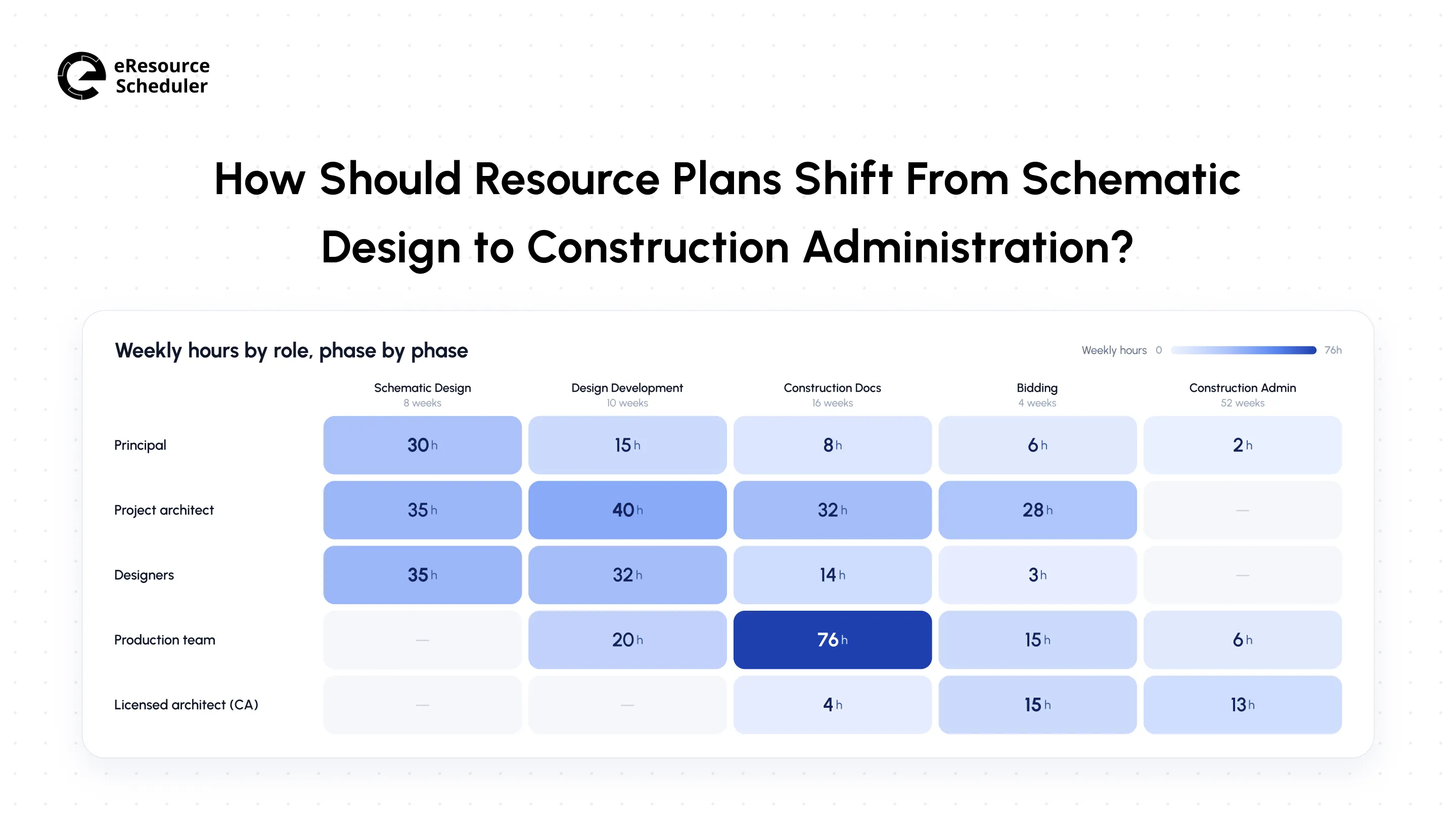
Here is how this plays out on a $600,000 project fee, split 15% SD, 20% DD, 40% CD, 5% bidding, and 20% CA.
1. SD ($90,000, about 805 hours): The team is small and senior, usually a principal, a project architect, and a couple of designers. Watch principal time because extra client meetings can use up the budget before any drawings exist.
2. DD ($120,000, about 1,074 hours): The project architect becomes the person consultants and designers depend on. If they are also carrying DD on two other jobs, a tool that flags the overload helps you prevent overallocation before deadlines collide.
3. CD ($240,000, about 2,147 hours): This is the peak, with four to six people producing the drawing set. Overruns here usually come from late design changes absorbed without adjusting the hours.
4. CA ($120,000, about 1,074 hours): The team narrows to a licensed architect and one support person, often for more than a year. This phase is easy to underplan because it overlaps with the same architect’s next project. Bidding uses the remaining $30,000, or about 268 hours.
Core Calculator: When does this Phase Run out of Fee?
Affordable Hours = Phase Fee × (1 - Target Margin) ÷ Blended Hourly Cost
Weeks of Runway = Affordable Hours ÷ Team Hours Per Week
Example: DD affords about 1,074 hours. A four-person team working 32 hours a week
each uses 128 hours a week, so the fee lasts about 8.4 weeks (1,074 ÷ 128). If your schedule
plans 12 weeks of DD, you know early that you need a smaller team, a tighter scope, or a fee
conversation with the client.
Knowing where the hours should go is half the job. The other half is getting software in place without disrupting the projects already underway.
Start with size, then test phases. Firms with 100 to 5,000 people should compare the enterprise tier first, while midsize firms and small studios can move faster within their own groups. Whatever makes your shortlist, roll it out in stages:
1. Clean up your people and project lists: Export roles, licenses, and active projects from spreadsheets or other disconnected tools, and agree on phase names firm-wide.
2. Pilot with one studio on a DD or CD project: These phases see the most movement, so they test the tool quickly. Plan for four to six weeks.
3. Connect timesheets before financials: Planned versus actual hours by phase is the first report principals will trust. Add rates and fees tracking once time data is clean.
4. Hold a weekly 30-minute resource review: Studio leads go through conflicts, open requests, and next month’s capacity together, then expand to the next studio.
During the pilot, watch one thing above all: Does the tool surface fee burn and handoff conflicts before they cost you? The right choice depends on your team’s needs, and a few weeks of live work will tell you more than any feature list.
*Figures and quotes above come from official vendor pages and public G2 and Capterra listings, current as of September 2026. Terms change, so confirm current details with each vendor before signing.
1. What is the difference between resource management and resource scheduling?
Resource scheduling is assigning specific people to specific work on specific dates. Resource management is a wider practice. It covers capacity planning, utilization tracking, forecasting, and the cost of each booking. Scheduling answers who is working on what this week, while management answers whether the firm has the right people for the work ahead.
2. Is resource management software worth it for an architecture firm?
For most firms, yes, once you compare its cost with the billable hours it recovers. A 150-person firm paying $6 per person a month spends $10,800 a year. Recovering just 100 lost billable hours at $150 an hour brings in $15,000, before counting avoided overtime or fee write-offs.
3. Who should own resource management in an architecture firm?
In firms of 100 or more people, a resource or operations manager often owns the schedule, while studio leads and PMs submit resource requests. Smaller firms tend to hand it to a principal or office manager.
4. Can resource management software track part-time staff and consultants?
Most tools can. You add part-timers and outside consultants as resources with their own calendars and weekly capacity, so their hours count toward phase plans without being treated as full-time. Check how each vendor prices these people before you load them.
5. What is a good utilization rate for an architecture firm?
Utilization is billable hours divided by available hours, and the right target depends on the role. Production team members usually carry the highest billable target, while principals spend more time on business development and management. Set role-based targets and review them monthly.

Plan Smarter. Schedule Faster. For Free.
Join thousands already using eResource Scheduler to align teams, time, and tasks seamlessly.
 ALL FEATURES INCLUDED