Two leaders called the same resource management consultant in the same week. The first call came from Sarah, an operations lead whose 180-person AEC firm* had missed its third deadline this quarter. She was ready to sign off on a full software migration. The second came from Mike, a resource manager, who described the same symptom (missed deadlines) but swore his software was fine and wanted a budget for a training overhaul instead.
One of them was right to blame the software. The other was about to buy training for a problem training could not fix. You have probably sat through this exact argument in a leadership meeting, blame bouncing between ‘the team is not executing’ and ‘the software cannot keep up’. Whoever is louder that day tends to win the budget.
What is frustrating is that most of these arguments trace back to a handful of recurring patterns that show up across completely different teams. Here is the four-part framework that settles it with evidence instead of volume, before anyone spends a dollar either way.
Strip away the finger-pointing, and a resource management failure is just this. Work isn’t getting done as planned, and the gap is costing you money, people, or both.
Sarah’s team was double-booked so often that two senior engineers quit within a month of each other. Mike’s firm lost a client entirely because a project ran three weeks over, and nobody could explain why until someone finally opened the billing report. Neither leader was wrong about the symptom. Both were ready to approve a fix before anyone had diagnosed the cause.

Here is the trap in one sentence. A missed deadline can come from a team that never agreed on what ‘done’ means or a tool that physically cannot show ‘who is free’. Guess wrong, and you pay double: once in the wasted spend and once in the failure that keeps happening.
Before you can fix either scenario, you need a way to sort your own symptoms the way Sarah and Mike eventually did.
Here is how common resource management failures break down once you trace them back to their actual root cause.
| Failure | Root Cause | Symptom |
| Missed Deadlines | No shared definition of priority or ‘done’ | Task updates land late and inconsistently across the team |
| Team Burnout | Managers assign work without checking real availability | The same few people keep landing on overlapping projects |
| Budget Overruns | The system can’t separate billable from non-billable hours | Finance flags mismatched numbers every single month |
| Shadow Spreadsheets | The official tool is too rigid or too slow for daily use | The team keeps a side sheet that becomes the main doc |
| Scope Creep | No formal change approval process exists | Tasks pile onto the timeline without anyone adjusting staffing |
| Skill Mismatches | Leads cannot see who is free with the right skills | The wrong person gets staffed on specialized work |
Notice the pattern. Half of these trace back to habits and agreements. The other half to what the software can or cannot do. This split is not random. It turns into a framework you can diagnose against, instead of argue about.
Behavioral scientist Ralph Kilmann describes the most common problem-management error as solving the wrong problem because people tend to define the problem through their own specialty. Sarah and Mike each did exactly this, one reaching for software and the other for training.
Here are the four gaps worth checking before you commit to a fix.
1. Clarity: Whether people actually know the goals, their roles, and the process they are supposed to follow. A team can be full of hard workers and still miss deadlines constantly if nobody ever writes down what ‘on track’ looks like every week.
2. Capability: Whether the team has the skill to execute, even once the process is completely clear. You can hand someone a perfect playbook, and they will still stall out if they have never been trained to run it.
3. Configuration: Whether the software mirrors how your team actually works every day. A tool set up straight out of the box (with none of its fields or approvals adjusted) will fight your team at every step, no matter how good it is on paper.
4. Ceiling: Whether the software has the raw technical power your operation needs right now. This is about the tool’s limits, not your team’s bandwidth. A tool that runs fine at 15 people can buckle completely at 60, and no amount of clever configuration fixes a ceiling that is simply too low.
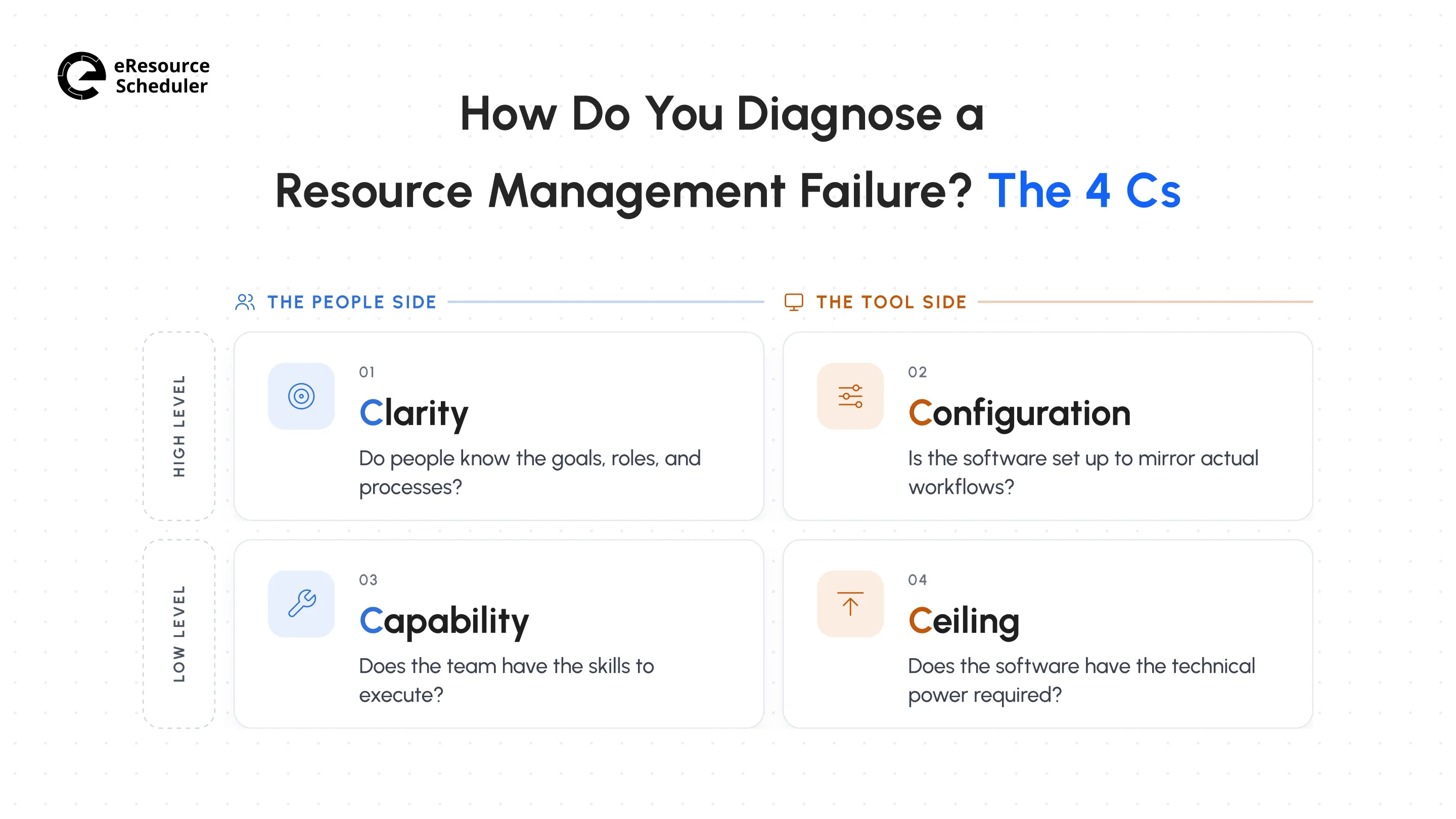
Four gaps, four very different fixes. Sarah and Mike’s stories will show you why guessing between them is such an expensive habit.
Sarah’s team showed up on time, communicated well, and genuinely wanted the system to work. What tripped them up was a Configuration gap (a tool implemented straight out of the box and never adjusted for how an engineering firm staffs projects). On the ground, this gap looks like:
Ceiling problems surface later, once you have outgrown what the tool was designed to handle. For Sarah’s firm, this ceiling showed up at month-end. The system would freeze while pulling numbers across 22 active projects at once, and alerts about a newly free team member would arrive hours late, well after a project lead had already found a workaround on their own.
Training will not fix a ceiling like this. What helps is resource management software built for the scale you are operating at now.

Mike’s software worked exactly as designed. The team still struggled because nobody had ever agreed on who had the final say when two project leads both wanted the same week from the same person. A PMI conference paper on resource management in multi-project environments found that resource unavailability is often the main reason projects fail when people are shared across several projects. In Mike’s case, it traced back to a Clarity gap.
Clarity gaps are easy to miss because nothing visibly breaks. Gallup’s Q2 2025 survey of US employees found that only 47% strongly agree they know what is expected of them at work. Without this shared understanding, even a well-built system fills up with conflicting entries nobody can sort out.
Capability gaps look different, closer to quiet avoidance than confusion:
This is rarely a software flaw. It usually means nobody worked through the practices that make adoption stick.
Fixing a tool problem and fixing a people problem call for entirely different budgets and timelines. Which is exactly why getting the diagnosis right matters before either one gets approved.
Mike’s fix cost him a single afternoon of writing things down. Sarah needed more, because a documented workflow cannot fix a system that is genuinely maxed out.
Closing a gap like this takes an actual system designed for it, not more discipline from the team. Wellingtone’s 2026 State of Project Management report found that 22% of project professionals surveyed still plan projects in Microsoft Excel, with another 11% running no project management solution at all. This often points to a tool that never earned enough trust to replace the workaround.
Sarah’s firm was in neither group. It already had a tool, which made the real gap harder to spot. She needed software configured around how her firm actually staffs work, with room to grow. Reconfiguring her old setup would have closed the setup gaps. It could not fix a system that froze every month-end at 22 projects. This is the wall most construction and architecture teams hit when they outgrow a setup nobody customized for running several concurrent projects at once.
Sarah’s team settled on eResource Scheduler to run resource management going forward. Within a month, her team could see who was free in real time rather than finding out about a conflict after a client had already called to complain. The software itself did not solve the diagnosis. It just gave the fix somewhere real to live.

What made the fix stick came down to specific features that most resource management tools simply cannot replicate. Here is what changed for Sarah’s team over the first quarter after the rollout.
| Q1 After the Rollout | Before | After |
| Conflicts Caught Before the Assignment | About 20% | About 67.9% |
| Time Spent Building the Weekly Staffing Report | ~5 hours | Under 45 mins |
| Active Projects Tracked Without Spreadsheets | 5 of 22 | 18 of 22 |
| Client Escalations Tied to Double-Booking | 6 | 2 |
| Time to Reassign a Resource After a Dropout | About 4 hours | About 2 hours |
Sarah’s team still keeps some smaller projects on a spreadsheet, mostly out of habit rather than necessity. They plan to fold them in as the next step now that the larger rollout has proven itself.
Sarah still keeps a screenshot of her old double-booking spreadsheet on her phone, half as a reminder and half as a joke she tells in every onboarding call now. Mike, on the other hand, never touched his software. He just wrote down (on one page) what ‘on time’ actually meant for his team, and the missed deadlines stopped within a month or two.
Neither of them got here by picking a side in the people-vs-tool debate before checking the facts. They got here by asking honest questions and following whatever answer came back, even when it was not the one they walked in expecting. Run your own version before you spend anything.
Quick Self Check: Ask Your Team Three Things (Preferably Anonymously)
1. Do you know exactly what is expected of you when you use our current system?
2. Is there a feature you know exists but have never been shown how to use?
3. Does the system get in the way of doing your job well?
The first answer points you toward Clarity. The second points you toward Capability. The third points you toward Configuration and Ceiling. Either way, you will know which part of the framework to work on next, rather than guessing in a meeting room.
*The firm’s name is not shared to protect its privacy.
1. How long should you spend diagnosing before committing to a fix?
Most teams can get a clear read within one to two weeks, using the anonymous three-question check alongside a quick look at where deadlines or budgets are actually slipping. Rushing past this step is usually what leads to buying software that was never the problem.
2. Who should be part of the anonymous audit, just managers or the full team?
Include the people actually doing the day-to-day work, not just team leads. Managers often have a skewed view of how smoothly a system runs, since frontline staff are usually the first to notice a Configuration or Clarity gap.
3. What if the audit points to both a people problem and a tool problem at once?
This happens more often than leaders expect. Fix the Clarity gap first, since unclear expectations will make it impossible to tell whether a new or reconfigured tool is actually working once you've made the switch.
4. How often should you re-run the people-vs-tool check?
Once a quarter is reasonable for most teams, or immediately after any major headcount change, a new client type, or a jump in project volume, since any of those can quietly shift you from a Clarity issue into a Ceiling one.
5. Is it possible to pilot a new resource management tool before committing company-wide?
Yes, and it's usually smarter than a full rollout. Run it with one team or one project line for a few weeks, since a small pilot will surface Configuration issues fast without putting your entire operation through a disruptive switch that turns out to be unnecessary.

Plan Smarter. Schedule Faster. For Free.
Join thousands already using eResource Scheduler to align teams, time, and tasks seamlessly.
 ALL FEATURES INCLUDED