Learn more
Managing teams is no longer about simply handing out tasks. In 2026, it’s a broader discipline where businesses focus on creating visibility into work, aligning workforce with priorities, and driving meaningful outcomes rather than just checking boxes.
As businesses level up, hybrid work becomes the norm, and delivery timelines narrow, task management software has become an important operational requirement rather than a nice-to-have. Present-day platforms now blend planning, execution, tracking, and automation to help teams stay effective without burnout.
Within the initial weeks of adoption, many businesses notice exceptional clarity around responsibilities and timelines, especially when using structured task management software like eResource Scheduler that centralizes work and communication in a single view.
Team management software in an organization acts as the central nervous system for the organization, which helps it to act as a unified hub where every department can coordinate on strategy and execution in real time.
It centralizes the following key activities:
These activities help give managers real-time visibility into who is working on what and enable a unified forward movement. Software that goes far beyond simple to-do lists adapts effective resource management tools.
By combining team collaboration tools with tracking and mechanization, teams can reduce distractions and keep work moving forward. Many businesses now connect with a team performance tracking system to measure productivity, efficiency, and delivery trends over time
Managing both remote and in-house teams while juggling multiple projects can feel like walking a tightrope. A single misstep can slow progress and leave clients dissatisfied. That’s where team management software with powerful, well-designed features steps in, bringing structure, clarity, and control to keep projects on track.
Choosing the right platform is no longer a matter of simply finding a glorified to-do list, but it’s about investing in a sophisticated system that aligns with modern work trends.
Allows you to create, assign, prioritize, and track tasks and projects with clear deadlines, statuses, and dependencies.
Offers shared calendars, timeline views, and syncs with tools so that everyone stays aligned.
It includes features like employee productivity tracking , real-time messaging, comments, shared documents, and discussion threads to reduce email clutter and speed up communication.
Visual dashboards and customizable reports provide insights into progress, performance, bottlenecks, and workload distribution.
Shows who’s available, who’s overloaded, and how work is assigned—helping balance capacity and prevent burnout.
Timely reminders and alerts keep team members informed of deadlines, changes, and upcoming tasks, eliminating the need for manual follow-ups.
eResource Scheduler (eRS) is an enterprise-grade resource management and scheduling software that strikes a balance between structure and adaptability. It equips organizations with a comprehensive set of capabilities that includes project tracking, team planning, capacity forecasting, time capture, financial tracking, and team collaboration tools, enabling leaders to clearly understand how work, time, and effort are distributed across teams.
Built with agencies and project-centric teams in mind, eRS provides team a capable employee timesheet software that replaces fragmented spreadsheets and disconnected tools with a unified workspace.
Ultimately, eRS helps organizations move away from guesswork and towards confident, insight-led productivity management decisions, making it a dependable long-term solution for teams serious about planning and performance.
Keep complete control over your people and skills with real-time visibility into availability, utilization, and workload so nothing falls through the cracks.
Drag-and-drop scheduling and role-based access and filters for resources, roles, and time tracking and financials.
Capture time accurately without friction. Turn logged hours into meaningful insights for productivity, billing, and performance tracking.
Plan with forecasting features that support long-term decision-making and strengthen your productivity management solutions across projects and teams.
Understand how much work your teams can realistically handle, prevent burnout, and confidently commit to new initiatives.

Built to handle complexity, Wrike delivers a consolidated work management platform with enterprise-level security and powerful customization. It stands out in resource management, making it an efficient enterprise workflow management solution for marketing teams and creative agencies that run intricate projects with multi-layered approval workflows.
Adapt processes with custom statuses, fields, and request forms to match any department.
Assign, track, set dependencies, add subtasks, and manage budgets for tasks.
Handles small teams to large enterprises with features for every department.
Generate insightful reports on project status, time, and performance.
When accurate time tracking and clear project profitability matter most, Clockify offers a reliable and scalable solution. Its standout feature is unlimited users on the free plan, making it an appealing choice for growing agencies, consultancies, and globally distributed teams operating across multiple time zones.
As a capable project tracking software that serves as a practical solution for agencies and service-based businesses.
Clockify functions as an application where employees can log time against tasks and projects, resulting in an accurate and efficient workforce management application.
With features like project assignments, capacity insights, and tracked hours, it works alongside resource and task planning tools to help managers balance workloads.
Clockify converts tracked time into invoices and reports, connecting productivity directly to revenue.
Scoro is an all-in-one work management platform designed for professional service teams. It combines project management, time tracking, resource planning, budgeting, and invoicing in a single system, helping businesses gain full visibility into projects, optimize team utilization, and improve overall profitability.
It lets you plan and manage projects with tasks, milestones, and deadlines. You can set dependencies and organize work in a central task and resource planning tool.
Its resource planner and utilization dashboards help balance workloads, forecast capacity, and avoid overbooking.
Scoro provides powerful reporting and dashboards with prebuilt report templates covering project progress, utilization, revenue, and profitability.
Beyond operations, it includes CRM capabilities for managing contacts, quotes, and sales pipelines, connecting workflow automation tools with revenue forecasting.
Scoro is more expensive than many alternatives and lacks a free plan, which can make it less suitable for small businesses or teams.
Its extensive feature set and deep customization can feel overwhelming for new users, requiring time, training, and careful setup before teams can fully adopt the platform effectively.
BigTime is a professional services automation software that centralizes project management, time and expense tracking, billing, and resource planning for firms. The cloud-based, AI-powered platform helps businesses improve project profitability and operational efficiency by providing real-time financial insights and streamlining workflows.
AI for staffing, autofill for time entry, automated reminders, and workflow automation.
Leverages advanced task and resource allocation tools to balance workloads, forecast capacity, and ensure the right people are assigned to the right work at the right time.
Connects with CRM, accounting, and calendar tools to centralize operations.
Functions as a strategic team performance tracking system, providing real-time insights.
Basecamp integrates simplicity over feature overload, offering a straightforward, communication-first approach to team management that cuts through complexity. This makes it efficient and effective for small to mid-sized teams who want to get organized without a steep learning curve.
Create, assign tasks, set due dates, and track completion for clarity on who's doing what.
A shared calendar for deadlines, milestones, and events with reminders.
Visual progress indicators showing project status (e.g., feeling good vs. needs work).
Standardize project setup for recurring workflows.
No custom fields, subtasks, dependencies, or Gantt charts. Tasks are basic "To-dos".
Lacks deep analytics, productivity monitoring, or activity tracking for performance.
Shaped by continuous user input, Hive delivers a collaboratively built project management platform that brings together multiple project views and strong collaboration features. Its flexible yet intuitive design makes it well-suited for client-facing teams and fast-moving environments that value adaptability without added complexity.
Access multiple project views like Gantt charts, calendars, and tables so that teams can visualize and manage work in the format that fits their workflows.
Keep conversations in a single view with built-in collaboration tools that ensure seamless communication across teams.
Features like Hive Mind for smart task creation and automated workflows that reduce manual effort and accelerate execution.
Customize tasks with dependencies that enable teams to adapt processes quickly while maintaining clarity and accountability.
Blending the simplicity of spreadsheets with advanced project management capabilities, Smartsheet provides a user-friendly platform for data-focused teams handling complex workflows. Features like conditional formatting and strong permission controls help keep even highly detailed projects well organized and secure.
Visualize team capacity, balance workloads, and forecast resource needs.
Assign owners, track progress, set dependencies, and manage milestones.
A spreadsheet-style grid for easy adoption, but with advanced project capabilities.
Set up automated workflows, alerts, and reminders for requests, approvals, and updates.
Airtable redefines work management by blending the approachability of a spreadsheet with the structural power of a relational database. This platform specializes in flexible, customizable workflows that adapt to your team’s unique processes rather than forcing them into rigid structures.
Connect different tables to share information, eliminating data duplication.
Go beyond text with attachments, checkboxes, dropdowns, formulas, and more.
Create "if-this-then-that" rules to automate repetitive tasks, like sending Slack alerts or updating records.
Multiple data views, including Gantt charts, Kanban boards, calendars, and timelines, to visualize work from different perspectives.
ClickUp positions itself as the ultimate one single solution, consolidating tasks, documents, chat, and goals into a single, highly customizable application. Its AI-powered assistant and 15+ view options help teams visualize work exactly how they need it, making it ideal for those looking to replace multiple tools with one unified platform.
Offers Gantt charts, list and timelines, allowing teams to visualize and manage work in the way that suits them best.
Automates repetitive tasks, notifications, and recurring workflows to improve efficiency and reduce manual efforts.
Comments, mentions, and document sharing keep team communication centralized and transparent.
Tracks time spent on tasks, generates detailed reports, and provides insights into project progress.
Zoho Projects brings enterprise-grade project management within reach for teams of any size, delivering robust features without breaking the budget. Its smooth integration with the wider Zoho ecosystem makes it an ideal solution for small and medium businesses aiming to simplify operations and boost efficiency.
It brings powerful project management capabilities to teams of all sizes, which makes it a practical team planning software for small to medium businesses.
Visualize project timelines with Gantt charts and track progress for comprehensive project planning and scheduling.
Built-in time tracking and timesheet management integrate seamlessly with Zoho Invoice, enabling automated billing and accurate time management application functionality.
Centralize with comments, discussions, and file sharing, ensuring everyone stays aligned on tasks and project objectives.
Advanced features may feel overwhelming for new users without prior project management experience.
Certain integrations and advanced reporting tools are available only in higher-tier paid plans.
Nifty provides a cohesive work management experience by consolidating project roadmaps, tasks, and team communication into a single, unified workspace. The platform specializes in milestone-based progress tracking with built-in AI assistance, making it ideal for teams juggling multiple projects or client portfolios.
Track project progress automatically with the help of resource and task planning tools , where tasks are completed with interactive visual roadmaps, keeping teams aligned on goals and deadlines.
Manage work with multiple perspectives, including Kanban, Timeline, Calendar, and Swimlane layouts, tailored to team preferences and project needs.
Communicate using built-in chat, discussion threads, and one-click video calls, ensuring all team interactions stay centralized.
Create and assign tasks with dependencies, priorities, and custom statuses to optimize workflow and improve team productivity.
Selecting the right task management software in 2026 is crucial for maximizing team efficiency, meeting deadlines, and achieving business goals. With an abundance of options available, it’s essential to focus on a smart and efficient time management application like eResource Scheduler that provides comprehensive features while remaining intuitive for your team.
Start by evaluating how well the software supports task and resource allocation tools. Efficient tools allow you to assign tasks and track progress in real time, ensuring that no project falls behind.
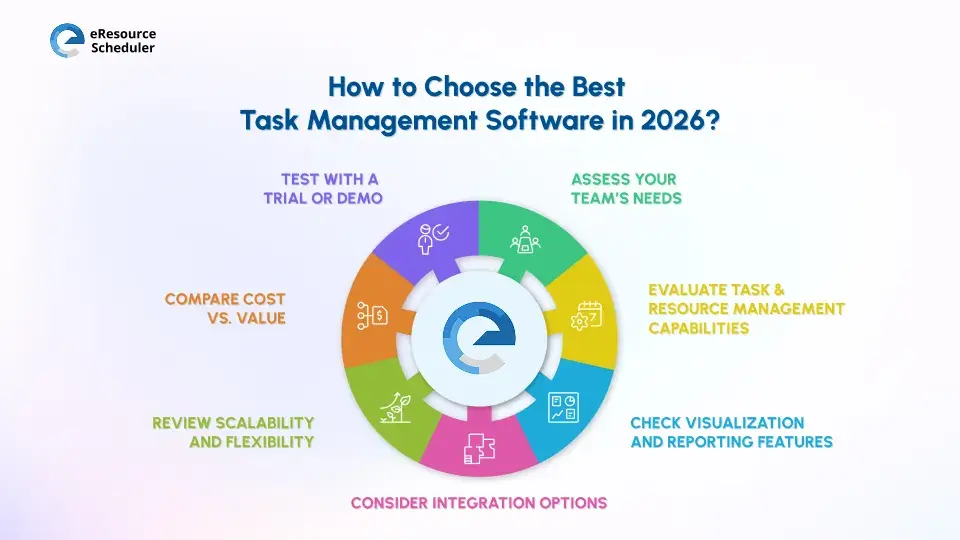
The following steps will guide you in evaluating, selecting, and implementing a solution that aligns with your team’s needs and supports overall project success.
Steps to choose:
1. Assess your team’s needs:
Consider whether you need features for employee productivity tracking or team performance tracking systems.
2. Evaluate task and resource management capabilities:
Ensure the software includes robust project tracking and workflow automation tools.
3. Check visualization and reporting features:
Choose platforms that offer multiple project views. Detailed reporting helps track progress and project profitability.
4. Consider integration options:
Integration with CRM, communication tools, and accounting software streamlines workflows and centralizes information.
5. Review scalability and flexibility:
Selected software should be able to handle increasing projects and team members without compromising performance.
6. Compare cost vs. value:
Consider subscription costs relative to features offered. Investing in one of the best resource management software and tools ensures long-term efficiency and ROI.
7. Test with a trial or demo:
Always trial the software to evaluate usability, adoption ease, and how well it aligns with your team’s workflow before making a final decision.

Achieving clarity, alignment, and measurable outcomes by using efficient task management software helps organizations to provide complete visibility into team capacity, availability, and skill sets. With advanced task and resource allocation tools, managers can ensure that the right people are assigned to the right work, avoiding bottlenecks and preventing overbooking.
eResource Scheduler (eRS) goes beyond basic task management to provide organizations with real-time dashboards, insightful reporting, and predictive analytics that empower teams to make informed decisions, track project progress, and optimize workloads efficiently.
It is designed to scale with your organization, whether you’re managing a small team or a large enterprise. It provides the flexibility and control needed to meet evolving business demands.
Start your 14-day free trial and experience empowered teams, improved productivity, and project delivery on time and within budget.
1. What is task management software?
Task management software is a digital tool for planning, organizing, and tracking individual and team tasks to improve efficiency.
2. What features should I look for in team management software in 2026?
Look for platforms that offer task and project management, time tracking, and resource allocation capabilities. Integration with other business tools is also essential.
3. Can these software solutions manage remote and distributed teams effectively?
Yes. Modern team management software supports multiple time zones, remote collaboration, and cloud-based project tracking to ensure distributed teams stay connected.
4. What types of reports can be generated with team management software?
You can create reports on project progress, team performance, resource utilization, and more. Customizable dashboards provide real-time data that can be tailored for specific audiences, which vary from team leads to executives.
5. What is the difference between project management and team management software?
Project management software tracks specific projects with defined start and end dates. Team management software focuses on the bigger picture, helping you manage ongoing team collaboration and daily work across your entire organization.


Plan Smarter. Schedule Faster. For Free.
Join thousands already using eResource Scheduler to align teams, time, and tasks seamlessly.
 ALL FEATURES INCLUDED