Learn more
The Getting Things Done method, often shortened to GTD, is a productivity framework built to clear mental clutter and turn intent into action. At the foundational level, the meaning of the GTD method is that it separates thinking from doing. Instead of trying to keep track of everything in your head, you can use a system that you can trust to keep track of everything, organize it, and process it.
The result is simple but powerful. Fewer missed commitments. Sharper focus. Work that actually moves forward, minus the unnecessary spreadsheet guesswork, all because of better time management.
If “busy” feels constant but progress feels slow, this is the reset.
The Getting Things Done method is a structured productivity system designed to move work out of the head and into a reliable workflow. Popularized by David Allen, the method focuses on one simple shift. Stop remembering tasks. Start managing them.
At its core, the meaning of GTD lies in creating a closed-loop system. Every commitment is captured, clarified, organized, reviewed, and executed. Nothing floats. Nothing gets lost.
This approach directly addresses how modern work actually breaks down. According to Productivity in the Workplace Statistics, a study by Trevor Hamilton, employees are interrupted roughly every three minutes on average, significantly fragmenting focus and slowing execution.
GTD solves this problem by making a single, organized system where every task is recorded and processed only once. This cuts down on the need to switch contexts over and over again and lets work continue without having to start over.
In short, GTD replaces reactive work with controlled progress.
| 5 Stages of Getting Things Done Method | Description |
|---|---|
| Capture | Everything lands in one place |
| Clarify | Turn inputs into actionable outcomes |
| Organize | Build GTD lists that actually drive work |
| Reflect | Keep the system relevant, not outdated |
| Engage | Execute based on context, not chaos |
GTD works by externalizing tasks into a structured flow. The brain stops acting as a storage and starts acting as a decision engine. The meaning of GTD becomes clear in how each task moves through a defined system instead of sitting in mental clutter. The system runs on five connected stages:
Collect every task, idea, and commitment in a single inbox. No filtering. No prioritizing.
What this looks like in practice:
Capture is about removing the fear of forgetting. Once everything is in the system, the mind clears up for actual work.
Every captured item gets processed. What is it? Is it actionable? What is the next step?
What this looks like in practice:
This is where most productivity systems break. Vague tasks stay vague, but GTD forces precision. This step reflects the meaning of GTD in practice, where clarity replaces hesitation, and every task is shaped for execution.
Tasks are sorted into structured lists based on context, priority, or ownership.
What this looks like in practice:
This is where GTD lists become useful. Work is no longer a long, chaotic list but is structured for execution.
The weekly review is what keeps GTD from collapsing into another task dump.
What this looks like in practice:
Teams that skip this step slowly lose trust in the system because tasks pile up, clarity fades, and the review resets everything.
Work gets done based on what makes sense in the moment. Context, time available, and energy level guide decisions.
What this looks like in practice:
Execution becomes smoother because decisions are already made. No second-guessing or friction.
Pro Tip
The power of GTD is not in the framework itself. It is in how consistently it is applied. When every task moves through capture, clarify, organize, reflect, and engage, work stops feeling reactive. It starts moving with intent.
Most GTD systems do not fail because the method is flawed. They fail because people try to build a perfect system before they build a plan that can actually work using resource planning software. At the core of the meaning of GTD is that it rewards consistency, not complexity.
Scattered inputs create scattered thinking. Emails in one place, notes in another, tasks in a third. That setup guarantees missed work. A single capture point fixes this. Every task, idea, or request goes into one system first. It becomes the default landing zone for everything that needs attention.
Clarity is what moves work forward. “Work on proposal” sits untouched. “Draft pricing section for proposal” gets done. Every task should answer one question. What is the next physical action required? The more specific it is, the easier it is to execute.
Overbuilding the system is a common trap. Too many lists, tags, or categories slow things down instead of helping. A lean structure works better. A few core GTD lists, a clean inbox, and a consistent workflow. That is enough to start seeing results.
Capture without processing creates a backlog. Tasks pile up, and the system loses credibility. Processing is where decisions happen. What matters, what does not, and what needs action. Without this step, GTD turns into just another to-do list.
Getting Things Done Summary
GTD is not about building a complex productivity machine. It is about creating a system that can be trusted every day. When the system is reliable, execution follows.
This is reinforced by Capterra’s 2025 Tech Trends research, where nearly 60% of software buyers reported regret due to poor usability or implementation challenges, highlighting how unreliable systems directly impact execution.
Stress is rarely about workload, but about unclear commitments. The meaning of GTD lies in eliminating that ambiguity by answering three questions at all times:
Instead of responding to whatever shows up, work gets planned and executed with clarity. When tasks are clearly defined and scheduled, time stops slipping through the cracks.A structured system exposes capacity gaps early, before they turn into delays. The result is not just productivity. It is control over how work unfolds.

Multitasking creates the illusion of progress. In reality, it fragments attention and reduces output quality.
This is one of the fastest performance gains teams notice with GTD.
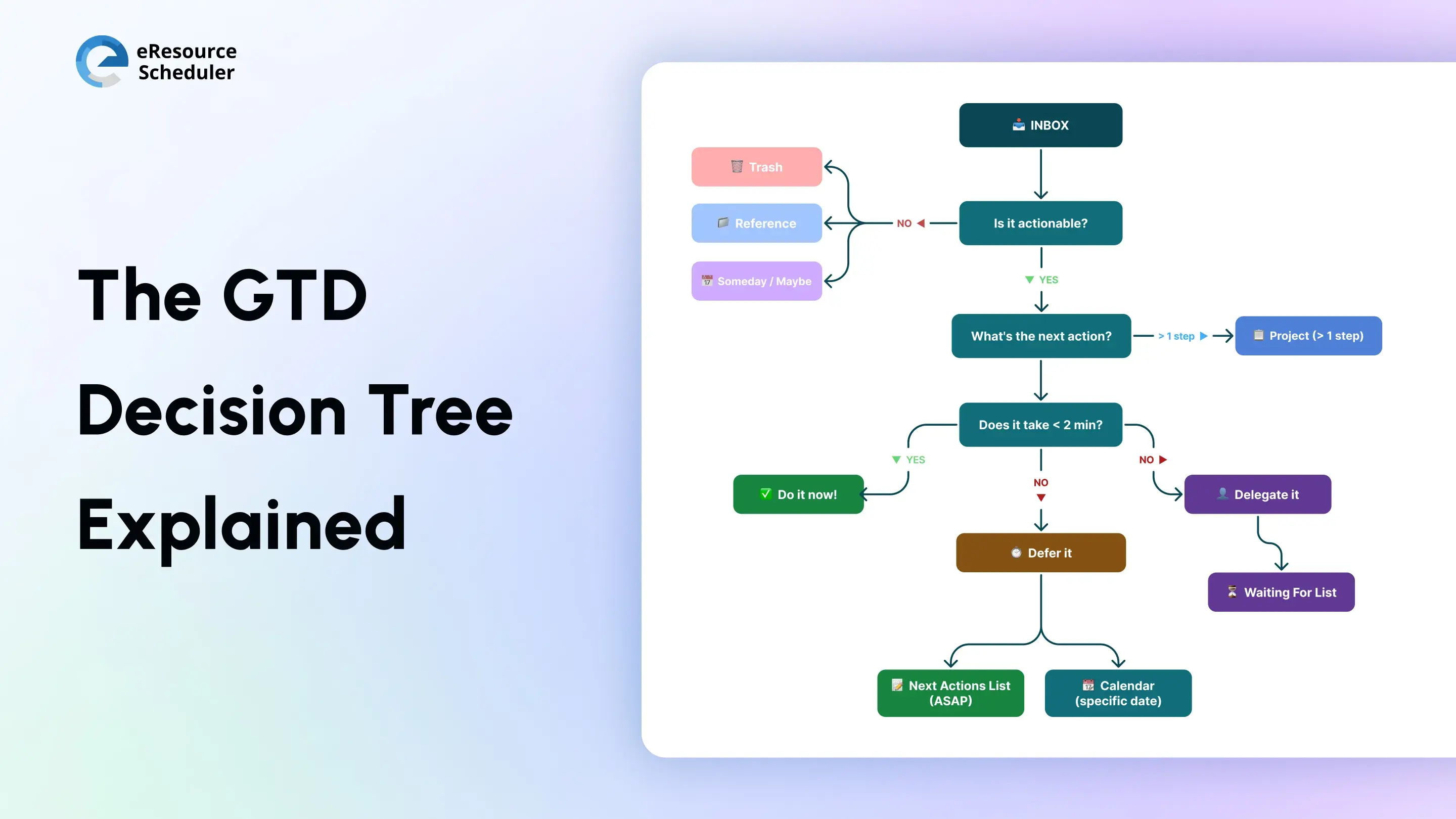
The GTD decision tree is where productivity shifts from thinking to doing. Every input that enters the system is forced through a simple set of decisions. This structure removes hesitation at the exact moment where most work gets stuck. Instead of revisiting the same task multiple times, decisions are made once and executed cleanly. In real workflows, this shows up as faster email handling, quicker delegation, and fewer tasks lingering in “pending” mode without clarity.
Research shows that multitasking and constant task switching can cut productivity by up to 40%, largely due to repeated decision fatigue and lost focus. (Source)
The GTD decision tree directly counters this by standardizing decisions upfront. Each task follows a predefined path, which reduces cognitive load and keeps work moving without interruption.
In consulting teams, where client deliverables, internal reviews, and shifting priorities collide daily, GTD brings structure to the chaos. Work is broken down into clear next actions, while “Waiting For” lists ensure dependencies across clients and internal stakeholders stay visible. This reduces follow-up gaps and keeps projects moving without constant status chasing.
Marketing teams benefit from GTD by turning complex campaigns into executable workflows. Every asset, approval, and distribution step is defined as a next action, which minimizes bottlenecks and confusion around ownership. Instead of reacting to deadlines, teams operate with clarity on what needs to move next and who is responsible for it.
For product and IT teams, GTD complements structured sprint systems by organizing tasks that fall outside planned cycles. These often include ad hoc requests, bug fixes, or cross-team dependencies that do not neatly fit into backlogs. By clarifying and tracking these separately, teams maintain focus on core development while ensuring nothing critical gets ignored.
In operations teams, where planning and coordination are central, GTD improves how work aligns with capacity. Tasks are clearly defined before being scheduled, which makes resource allocation more accurate and predictable. This reduces last-minute adjustments and ensures that execution stays aligned with actual team availability.
Across industries, the outcome is consistent. When tasks are clarified and structured, teams spend less time figuring out what to do and more time actually doing it.
GTD does an excellent job of defining what needs to be done. Once GTD lists are in place, the next challenge is assigning the right work to the right people at the right time. Without visibility into who is available, even the most well-structured GTD system can lead to overbooking, missed deadlines, or uneven workloads. Tasks may be clear, but execution still breaks under poor allocation.
Resource scheduling software bridges this gap by layering capacity planning over GTD workflows. In practice, this means fewer last-minute reshuffles, better workload balance, and more predictable delivery timelines. Teams move from reactive adjustments to proactive planning.
This is where eResource Scheduler fits in. Not as a task manager, but as a system that brings visibility to resource allocation. When GTD defines the work, and eResource Scheduler aligns it with capacity, execution becomes far more reliable.
GTD does not fail because of complexity. It fails when the system stops reflecting real work. The difference between teams that stick with GTD and those that drop it is simple. One treats it as a living system. The other treats it as a one-time setup.
The weekly review is where the system resets and regains trust. It is not just about cleaning up tasks. It is about validating priorities, closing open loops, and ensuring every active project has a clear next action. Without this step, lists become outdated, tasks lose context, and the system quickly turns unreliable.
Long, cluttered lists slow down decision-making. When everything looks important, nothing gets done. High-performing teams regularly prune their GTD lists by removing outdated tasks, parking low-priority work, and focusing only on what can realistically move forward. The goal is not to track everything forever, but to surface what matters now.
Projects often stall because they are tracked as single items instead of a series of actions. GTD works best when every project is broken down into clear, physical next steps. This removes ambiguity and ensures progress is continuous, not dependent on bursts of motivation or last-minute urgency.
Switching between tools disrupts the system more than it improves it. Every change resets habits, fragments data, and introduces friction. Teams that succeed with GTD pick a stable setup and refine it over time instead of chasing new tools. Consistency in tools leads to consistency in execution.
A GTD system that looks good on paper but does not match how work happens in reality will not last. The system should adapt to existing processes, team structures, and communication flows. When GTD mirrors real workflows, it becomes effortless to maintain and naturally integrates into daily work.

The Getting Things Done method remains relevant because the problem it solves has not changed. Work is complex. Attention is limited. Clarity is rare. GTD offers a structured way to handle that complexity. It creates a system where tasks move forward without constant mental effort. For teams and individuals operating in high-demand environments, that shift is not just helpful. It is essential.
GTD is not about building a complex productivity machine. It is about creating a system that can be trusted every day. The meaning of GTD comes down to reliability in execution. When the system is reliable, execution follows.
1. What is the meaning of Getting Things Done method?
The Getting Things Done method is a productivity system that helps capture, organize, and execute tasks efficiently. The method focuses on moving tasks out of the mind into a trusted system to reduce stress and improve focus on work.
2. What are the 5 steps of the GTD system?
The 5 steps are capture, clarify, organize, reflect, and engage. These steps create a structured flow from task collection to execution. Each step ensures that work is clearly defined and consistently reviewed.
3. How is the Getting Things Done method different from a to-do list?
A to-do list is a static collection of tasks, while GTD is a complete workflow system. GTD focuses on defining next actions, organizing tasks into contexts, and regular reviews.
4. What are GTD lists and how do they work?
GTD lists are categorized into task groups such as Next Actions, Projects, and Waiting For. They help organize work based on context, priority, or status. This structure makes it easier to decide what to work on at any given time.
5. Is the GTD method suitable for teams or just individuals?
When properly modified, the GTD approach benefits both people and businesses. It helps teams better coordinate, monitor dependencies, and define roles. When paired with scheduling and resource planning tools, it becomes particularly successful.


Plan Smarter. Schedule Faster. For Free.
Join thousands already using eResource Scheduler to align teams, time, and tasks seamlessly.
 ALL FEATURES INCLUDED