Learn more
Employee scheduling software is an important part of running your business. Most businesses still use traditional methods to schedule their employees and track them through inefficient ways that create hassles in the long term.
Managing employees can be a big burden when you have a large team. There are a lot of instances when businesses face challenges related to overscheduling or not assigning the right task to the resource based on skillset, which might lead to project failures. To address such challenges, use a resource management software. It can help you meet business goals and project deliverables while managing and monitoring resources effectively.
In this blog, we will talk about the importance of employee scheduling software and also list the top 10 scheduling apps for 2026.
An employee scheduling software is a powerful tool that helps businesses create and manage employee schedules to run the business efficiently with proper planning, while keeping in consideration various aspects related to resources. This type of software can be used to track employee availability, create shift patterns, and track time off requests.
These days, resource scheduling software comes with many features targeted toward bundling solutions that can be useful for both businesses and employees. The various features of scheduling software are timesheet management, shift planning, payroll management, resource reporting, resource availability, etc.
Definition of employee scheduling software
Employee scheduling software helps
digitally schedule employees, track employee shifts, and align resource utilization to the company's
goals. Scheduling platforms can also improve team communication, generate labor reports, and ensure
projects get completed on time.
Employee Scheduling plays a major part when it comes to managing a business efficiently. With scheduling software, you can easily create and manage employee schedules. You can track employee hours, assign shifts, and manage vacation and sick days. This can help you to improve efficiency and productivity in your business.
Operational efficiency isn’t a tooling problem. It’s an execution problem. Gartner’s research on Top HR Trends and CHRO Priorities for 2026 makes that clear. Leaders are prioritizing how work gets structured and delivered, not just who does it. Yet much of scheduling still runs on fragmented systems and manual decisions.
Employee scheduling software can also help you to save time and money, since if you can track your resources, you can track if project deadlines are going to be met in time and within budget.
The employee scheduling software is designed to cater to the specific needs of businesses in terms of managing resources in a better way. It might differ in terms of operations for different companies, as every company has a different time schedule and different requirements to manage resources. So, having the right kind of resource scheduling software can be a boon for your business.
Here are some of the benefits of using a scheduling tool for your business:
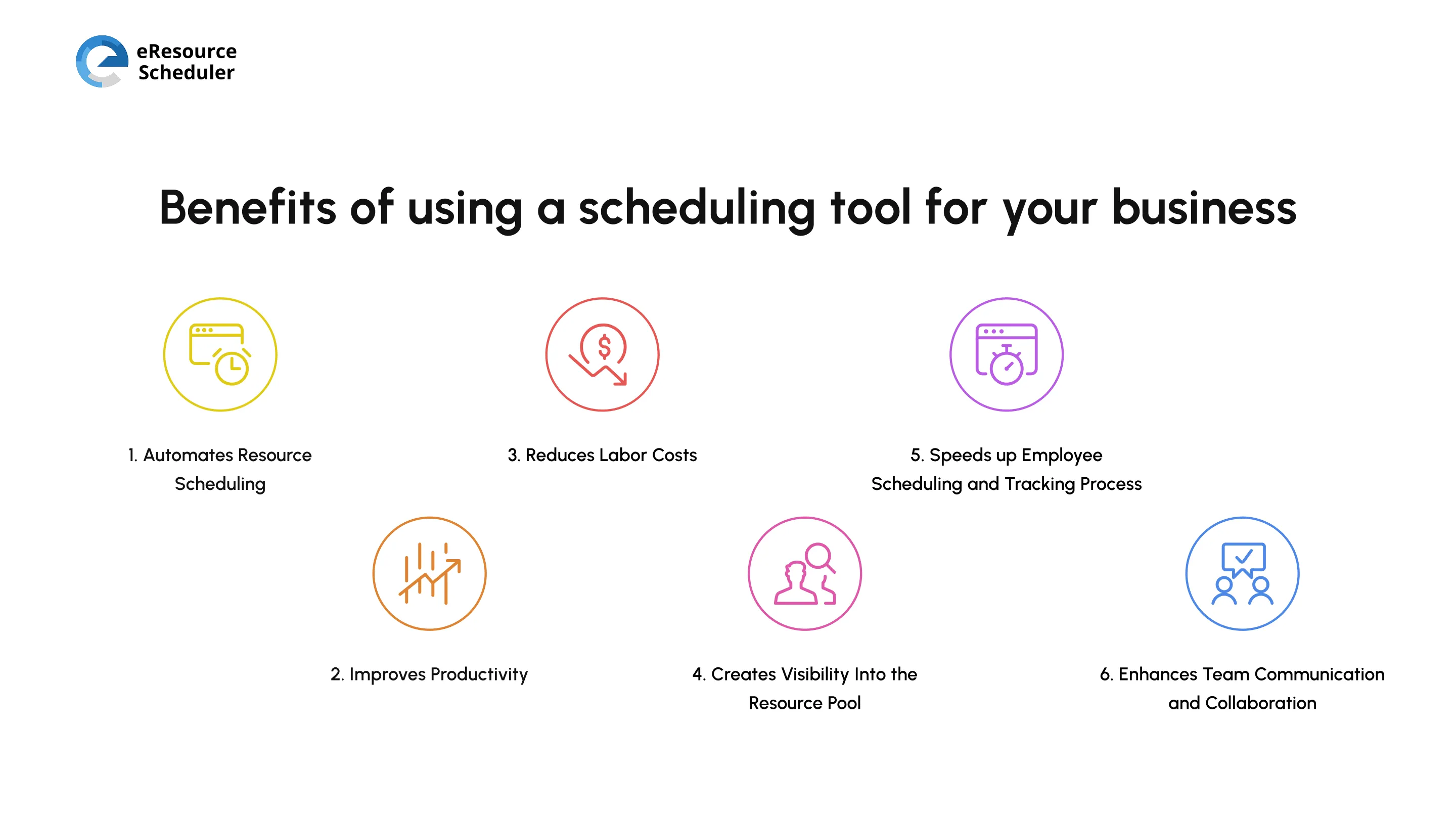
The tool automates leaves, calculates overtime, time shifts, etc., for all the resources spread out in different locations, efficiently, so that the manager can get a clear view of the availability of the resource.
Automated scheduling also notifies and creates time schedules based on resource availability to accelerate resource management in an efficient manner. Ultimately, it helps save time, money, and resources.
With scheduling software, a resource or project manager no longer has to spend time on calls or go through endless email chains to schedule or change shifts. Scheduling software tracks employee availability and workload in real-time. This allows managers to see who's available for upcoming tasks, avoid resource conflicts, and ensure projects are staffed effectively.
The simple drag-and-drop functionality helps schedule resources easily and make shift swaps. Employees are instantly notified of the changes, so they are always working on the most pressing tasks, and everyone is on the same page.
A shift planning software will also highlight the cost per resource assigned. Based on this data, you can control labor costs. The software also allows you to compare schedules, track time, and identify if there are instances of unnecessary overtime occurring. The time tracking feature helps to reconcile timesheets accurately.
Research on workforce systems shows that time and attendance data play a critical role in preventing financial discrepancies caused by unmanaged overtime while improving payroll accuracy.
With a scheduling tool, you can ditch the spreadsheet and scattered emails and get all the employee information through a centralized platform. At first glance, managers can understand the strengths and limitations of their workforce, including hourly employees and remote teams.
As the scheduling process speeds up, it saves time for everyone involved. Employees can access their work schedule through their mobile devices. They can swap shifts or request time off. All changes will be sent through immediate push notifications. Managers, on the other hand, can put an advance notice about future project requirements, compare wage costs, and access sales forecasts through the app.
Myth vs Reality
Myth: Giving employees more
control over schedules leads to chaos and misuse. Managers need tight control to keep schedules
running smoothly.
Reality: Control drives accountability. When
employees can see workloads, swap shifts, and plan ahead, they make more responsible decisions.
Transparency does the heavy lifting. Clear visibility reduces back-and-forth, speeds up decisions,
and builds trust without constant oversight.
Employees gain more transparency and control over their work schedule with an employee management tool. They can request shifts and projects they like, manage a work-life balance, and also see how their role fits into the bigger organizational goal. This visibility fosters trust and bonding. When employees feel safe and secure, they are more willing to open up and collaborate with others.
The software also reduces the time wasted playing phone tag to find a shift replacement. Through the software, they are empowered to find solutions themselves. Employees can even set advance notices about their work schedule, so managers can accommodate those requests.
What is the best employee scheduling app in the market? That is a loaded question. It depends on what your business is looking for. But we've done our research, and here's a list of the 10 best employee scheduling software for 2026.
eResource Scheduler (eRS) is an enterprise resource management and scheduling software that helps businesses optimize their resource utilization by offering them a centralized solution focused on managing resources, capacity planning, financials, management reports, project scheduling, and more.
eResource Schedule is a market leader in employee scheduling thanks to features including resource requests, skill matching, drag-and-drop scheduling, semi-auto scheduling, and more. Everyone can schedule resources while on the go thanks to the eRS mobile app, which offers everything from schedules and time entries to in-sync notifications.
With eRS, organizations can improve visibility into project schedules, identify potential resource conflicts, and make better-informed decisions about resource allocation. It also offers an integrated suite of tools for resource managers, including a real-time resource utilization dashboard, project portfolio management, and resource utilization reporting.
The forecasting model presents upcoming pipeline projects and their demands, which help identify resource shortages or skill gaps in advance. This enables management to make strategic decisions on hiring and training staff.
This is a flexible resource scheduling software that offers attractive and easy-to-read visuals of weekly schedules. With access to over 200+ templates, it provides a visual interface that makes it easy to see team availability and how they are being utilized.
Managers can also easily track resource utilization metrics through a calendar format or a Gantt chart. The tool also offers integration with common productivity tools like Google Docs, Zapier, Slack, Microsoft Teams, etc.
This tool automates the process of scheduling resources for businesses more dynamically and flexibly. It allows businesses to set up rules and preferences for how resources should be scheduled. This can save businesses a lot of time and effort, as they no longer need to manually schedule resources. Additionally, the software can also help in routine tasks related to onboarding, payroll, reporting, etc.
A simple and effective tool to build and share schedules, this program offers time-off tracking, resource scheduling, and lots more in a single software. It even lets you record the location of employees along with time-tracking functionality to ensure business compliance and avoid unnecessary overtime expenditures.
OnTheClock comes with the option to integrate with popular accounting solutions and payroll providers like QuickBooks and ADP.
This is a software that helps hospitality companies better manage their workforce. This staff scheduling software provides a centralized platform for managing employee availability, shift patterns, and vacation requests.
OpenSimSim comes with a Team Messaging option to improve team communication and collaboration. between managers and employees, and to make it easier to identify and resolve staffing issues. It can also help small businesses with processing payroll.
This tool offers one-click auto-scheduling that will help you create schedules in a breeze. It is one of the workforce software solutions that can be used to manage shift time patterns with multiple scheduling options. It can also be used to complete shift trades, track open shifts, and improve team communication.
An effective staff scheduling software that analyzes and puts resources in the right place while evaluating where the resources are required the most. It is the perfect tool to build workforce roasters without any hassles with features like dashboard metrics, applicant tracking, automation, etc.
QuickBooks time tracking software for resource scheduling is a cloud-based software that allows you to manage a modern workforce. Businesses can make better decisions about resource allocation without facing any challenges.
The dashboard has robust reporting metrics, like labor reports, as well as an easy interface that allows you to build schedules, track availability, and publish schedules. It also allows employees to see their open shifts, swap shifts, drop shifts, and request time off through a mobile app.
Another efficient scheduling app that lets businesses empower their employees to perform time tracking, time management, shift management, etc. It also lets employees track their performance through effective data analysis and management features built into the application.
It can also work as an end-to-end resource planning tool that can offer expense tracking and payroll integration. Overall, this tool helps manage various aspects related to resources.
Homebase rounds off our list of resource scheduling and time scheduling for teams. This software lets you effectively manage resources, optimize scheduling, and improve overall business operations.
There are built-in schedule templates that you can use to create interactive work rosters based on resource scheduling effectively and efficiently. The in-app notification and scheduling feature in the app keeps resources updated about their shift schedule through push notifications, text messages, and reminders.
| Software | Best For | Key Strength | Standout Features |
| eResource Scheduler | Resource-intensive teams | Strategic resource scheduling | Capacity planning, forecasting, utilization dashboard |
| Monday.com | Visual planners | Intuitive UI | 200+ templates, Gantt charts, integrations |
| Paycor | HR-led teams | Automation | Rule-based scheduling, payroll, onboarding |
| OnTheClock | Compliance-focused teams | Time tracking accuracy | GPS tracking, payroll integrations |
| OpenSimSim | Hospitality businesses | Workforce coordination | Availability tracking, team messaging |
| Rotageek | Shift-heavy teams | Auto-scheduling | Shift trades, open shift tracking |
| Tanda | Data-driven staffing | Smart allocation | Demand-based scheduling, dashboards |
| QuickBooks Time | Finance-integrated teams | Reporting + payroll sync | Labor reports, mobile scheduling |
| Factorial | Growing teams | All-in-one HR + scheduling | Time tracking, performance tracking, payroll |
| Homebase | Small businesses | Ease of use | Templates, notifications, shift reminders |
Do you find yourself wondering, "What's the best employee scheduling app?" When there are so many free employee scheduling app in the market, how do you decide what is the right fit?
Here are some of the prompts to help you improve on this:

Choosing the right employee scheduling software is less about ticking feature boxes and more about how well it aligns with the way work actually gets done. The best systems bring clarity to resource allocation, control over costs, and consistency in execution.
As teams scale, this shift from manual coordination to structured scheduling becomes a competitive advantage. In the end, the right tool doesn’t just manage schedules, it drives better business outcomes. Build schedules within a few minutes with eResource Scheduler. Focus on what's most important. Sign up for a trial today!
1. What is employee scheduling software?
Employee scheduling software helps businesses plan shifts, track employee availability, and manage workloads from a centralized platform. It replaces manual methods like spreadsheets with real-time visibility into resource allocation. This makes it easier to assign the right people to the right work at the right time.
2. Why do businesses need employee scheduling software?
Businesses use employee scheduling software to reduce scheduling conflicts and improve operational efficiency. It helps managers track employee hours, manage time-off requests, and align staffing with demand. This leads to better productivity, smoother operations, and improved cost control.
3. What features should I look for in scheduling software?
Key features to look for include shift planning, time tracking, resource availability, and reporting. Integrations with payroll and communication tools also improve efficiency. Beyond features, ease of use and scalability are critical for long-term adoption.
4. What is the best employee scheduling software for small businesses?
The best employee scheduling software for small businesses depends on team size and operational complexity. Most small teams benefit from tools that are easy to use, affordable, and quick to implement. Solutions like eResource Scheduler with mobile access and configurable scheduling features are usually a strong starting point.
5. How does employee scheduling software reduce labor costs?
Employee scheduling software helps reduce labor costs by optimizing staffing levels based on actual demand. It tracks employee hours and highlights overtime, helping managers avoid unnecessary expenses. Over time, this leads to more accurate payroll and better control over workforce spending.


Plan Smarter. Schedule Faster. For Free.
Join thousands already using eResource Scheduler to align teams, time, and tasks seamlessly.
 ALL FEATURES INCLUDED