You are deep into a project when someone flags a scheduling conflict you did not see coming. Now you are rearranging three calendars just to keep things moving. This scramble means you were reacting, not forecasting, and you are not alone. Every project manager has faced this at least once.
The project managers who look calm in every meeting are not working harder. They saw the gap three weeks ago, while they still had options. Resource forecasting is how you get there, starting with how you forecast demand.
Resource forecasting is the practice of predicting what your projects will need before the need shows up (whether it is people, time, equipment, or budget). Instead of discovering a staffing gap the week it becomes a crisis, you catch it 2 to 3 weeks out, while you still have options.
Think of forecasting and planning as two different jobs. Checking your bank balance tells you where you stand today. Building a monthly budget tells you where you are headed. Resource planning is the budget. Forecasting is what feeds it honest numbers.
You do not need a data team to do this well. Most of it boils down to looking at your current workload, what is coming down the project pipeline, and your team’s real capacity. Once these three are in your hands, ask yourself: ‘Based on what is ahead, do you have enough people? Are they the right ones for the job?’
The payoff shows up in places you deal with every week. Be it staffing, budget, team morale, or how confident you feel walking into a client call. When you forecast well, you move people before panic sets in. You can catch budget overruns with small corrections rather than end-of-quarter surprises. Your team stops absorbing last-minute scrambles.

The difference between these two paths is not about who works harder or cares more. It is about when the same information reaches you. A staffing gap exists whether you catch it or not. The only question is whether you are looking three weeks or three hours out. This single timing gap turns a reassignment into a missed deadline.
| Area | Without Forecasting | With Forecasting |
| Staffing Gaps | You learn about it hours before the deadline | You spot the same gap weeks out |
| Budget | The conversation happens after the overrun | The conversation happens before the spend |
| Team Assignments | Your strongest people get pulled to put out the fire | People get assigned based on what is upcoming |
| Client Conversations | You are explaining a delay after it was noticed | You are flagging a risk before a reason to ask comes |
| Decision-Making | Plans get adjusted based on the loudest employees | Plans get adjusted based on what the data shows |
| Team Morale | People absorb last-minute scrambles weekly | People trust that surprises will be caught in time |
None of this requires perfect prediction. Getting the direction right two weeks out changes how a project feels to run. For you and everyone waiting on your calls.
This kind of direction comes from a forecast built in the right order.
A resource forecast sets the work you expect against the people available to do it, role by role and week by week. Four steps get you there.
Start with confirmed projects, then add the pipeline. Work that is likely but not signed still belongs in the forecast, just at a lower weight. Count confirmed work at full hours and likely work at a share of them, based on how often your past proposals have closed. Leave the pipeline out, and the forecast looks calm right up until three projects land in the same month.
Ten people never give you ten people’s worth of hours. Take each person’s working hours, then subtract leave, holidays, training, and time already booked elsewhere. What remains is the capacity you can promise, and resource capacity planning is about working with it.
Total hours hide problems. You can have spare hours across the team and still be short of senior developers in March. Set demand against capacity for each role, week by week, and mark every week where demand wins. Each one is a decision waiting to be made: hire, borrow, reschedule, or say no.
A forecast starts aging the day you finish it. A proposal closes, a deadline slips, someone hands in notice. Review it weekly and swap estimates for actual hours as they come in. A short weekly check beats a big quarterly rebuild.
Once the gaps are on the page, the job shifts from predicting to deciding who goes where.
Most of this starts with a proper project timeline, since forecasting without one just means aiming at a moving target.
This goes beyond headcount. It means naming the specific skills, equipment, or budget the work calls for. ‘Two developers’ means something different depending on whether the project needs someone who can also handle client calls or just write code.
Teams lean on a Gantt chart at this stage. For anything with a tight sequence-dependent deadline, it is also worth knowing whether PERT or CPM fits the project better.
Certifications, location, availability windows, etc. must be visible alongside their name (not live in a separate spreadsheet). A person can look free on paper and can still be the wrong fit if they are three time zones away from the client meeting site. Or if their certification is no longer valid.
Not every piece of work is ready for a name. While a project is still in the pipeline, log it as a requirement: the role, the hours, and the dates, with nobody attached yet. This keeps future demand visible in your forecast long before anyone is booked.
Some teams formalize this with resource requests, which cuts down on the back-and-forth of chasing down who is free.
This is the step most teams skip. It is also the one that causes the most pain down the line. A double booking rarely shows up as an obvious conflict. It usually looks like someone falling behind on two things at once. By the time you notice, you are already close to missing a deadline.
Resource leveling and smoothing are the fixes teams reach for in this situation. Now, you are not asking one person to do the work of three in week two and idle in week four.
A plan only helps if the people who need it can see it without layers. This means your team, your stakeholders, and anyone waiting on a deliverable should be able to check where things stand. It also doubles as a sanity check.
Once a plan is visible to more than just you, someone can catch the one assignment that does not add up to the whole picture.
Do this consistently, and forecasting stops feeling like a special project. It becomes the way you run things daily.
Spreadsheets and disconnected tools can carry this for a while, right up until your team grows past the point where one person can hold every project’s status in their head. This is usually the moment dedicated resource management software stops being a nice-to-have. It starts being the only thing keeping projects from colliding.
It pulls your current workload, upcoming projects, and team availability into one place. Instead of cross-checking three separate sheets and two different software tools, you get a live view of who is free, who is overbooked, and where a gap is forming. Good tools also flag conflicts, catching overlaps the moment they happen.
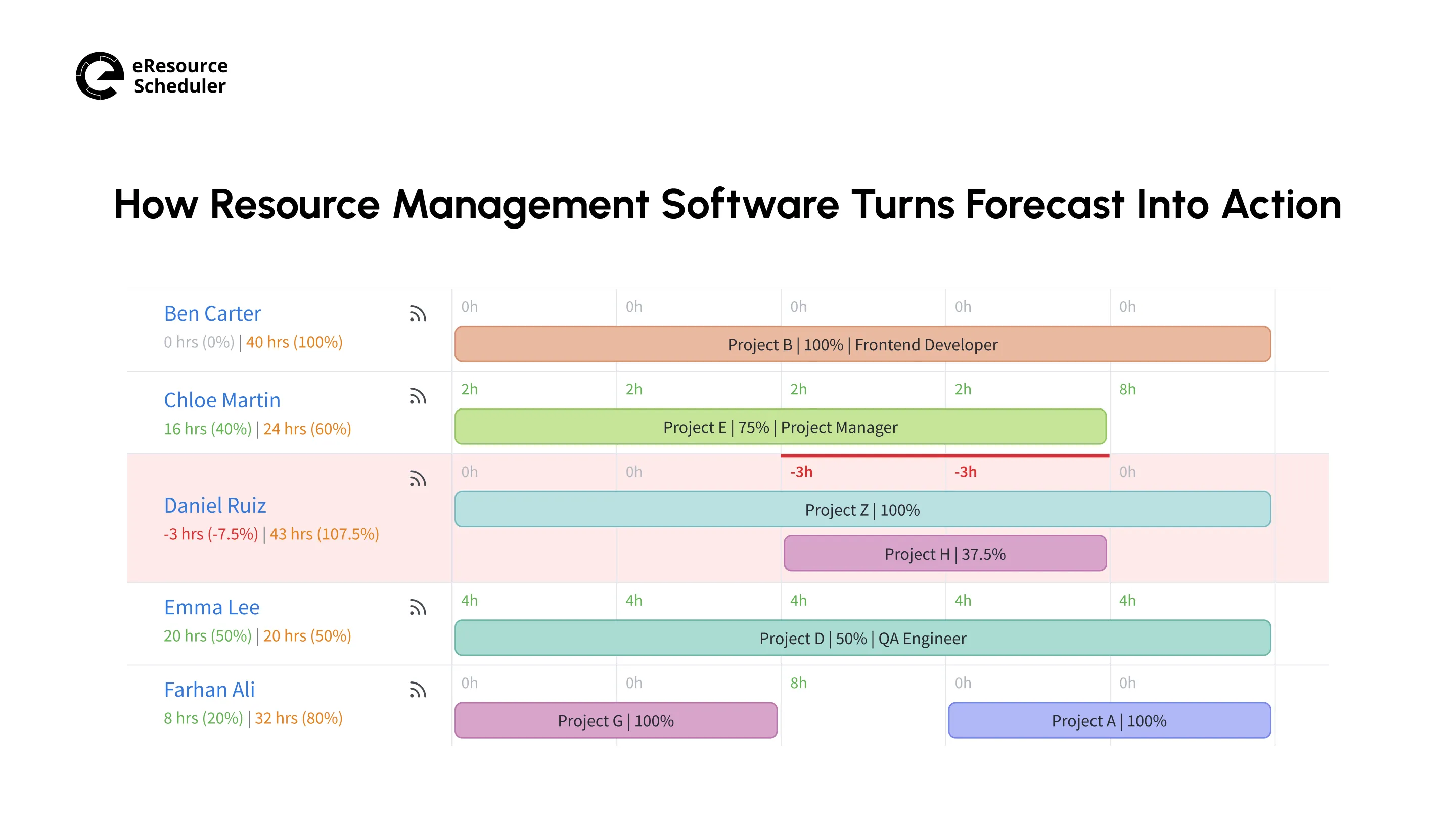
A view like this turns a forecasting habit into something you can see at a glance instead of something you calculate every Monday morning.
What changes is not just what the software can do; it is what you stop doing yourself. You no longer ping three people to confirm who is actually free this week. The software knows this, updating the moment someone logs a booking or wraps a task.
This is what saves time daily (not the dashboard), just not being the human syncing point between five different calendars anymore.
The software earns its keep when the forecast no longer depends on whoever last updated the spreadsheet.
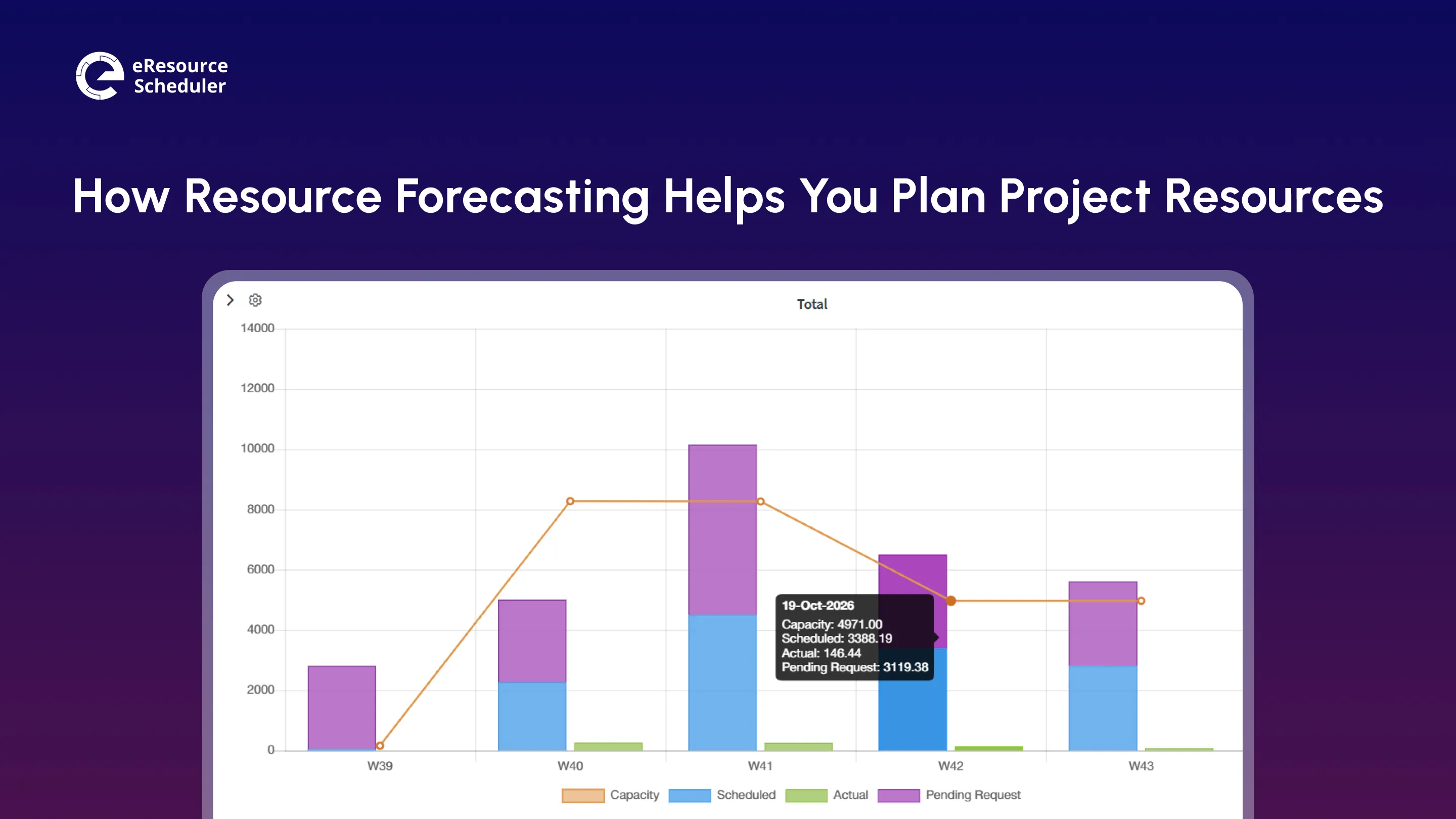
A spreadsheet tells you whether one person is free. Software tells you whether your team can carry what is coming. Demand and capacity sit side by side for each role, so a staffing shortage in one skill shows up weeks before it turns into a late delivery. You stop hunting for a free name and start reading the shape of the gap.

A utilization report tells you who was overloaded last month. A utilization forecast tells you who will be overloaded next month, which is the only version you can still act on. With booking and opening requirements in one place, the software projects each person’s load forward and flags who is heading past full capacity. Reports that connect people, projects, and profits show where this load comes from.
Forecasts go stale when nobody updates them. When tracking progress on active projects lives in the same tool, actual hours replace estimates as the work happens and the forecast corrects itself. The numbers that come out of it are ones you can defend in a budget conversation:
Heads Up
Pull your utilization forecast before a planning meeting, not during one. Walking in with
the numbers already in hand keeps the conversation focused on decisions, not data gathering.
Two project leads, both running four active sites for their construction firms, get the same early signal this week. One site is pulling ahead of schedule. Another is quietly short on skilled labor. Same information, same timing. What happens next is where they split.
One of them has this information sitting in six separate spreadsheets and tools, one per site. It updates whenever someone remembers to. Spotting the connection between the ahead-of-schedule site and the short-staffed one means noticing it manually. Which usually happens a week too late, if at all.
The other one works from eResource Scheduler, where all six sites’ bookings sit under one shared view. The slack on one site and the shortage on another show up next to each other without anyone looking for a connection. Moving the right specialist over becomes a scheduling change made the same afternoon.
The gap between these two outcomes is not effort or experience. It is what the tool puts in front of you. In eResource Scheduler, work that nobody has been assigned to yet shows up as a pending requirement on the same dashboard as capacity and utilization, so a shortage weeks away is visible before anyone is booked. Capacity also comes from each person’s own working calendar, so working hours and holidays are already counted in the number on screen.

The test for any tool is simple. Forecasting should already be on screen when you open it, not something you dig up.
Resource forecasting is not something you run once at the start of the project and forget. It is a habit, built on a few core techniques, backed by software once your spreadsheet and tools stop keeping up, and supported by a team that looks at what the forecast is telling them.
Pro Tip
Set a recurring fifteen-minute slot each week to glance
at your forecast, not rebuild it from scratch. Software that updates itself only helps if
someone looks at what it is showing.
Start small. Pick one upcoming project and forecast it two weeks further out than you normally would. Observe and see what you catch. Once this habit becomes routine, the next step is to get a clear handle on resource allocation and how it turns forecasts into assignments.
The goal is not a perfect forecast. It is a Friday afternoon with no fire drills.
1. Who is usually responsible for resource forecasting on a project?
Typically, the project manager or resource manager. Still, on larger teams it often becomes a shared responsibility between them and team leads who know their people’s real availability best.
2. Is resource forecasting the same thing as capacity planning?
They are closely related but not identical. Capacity planning looks at how much work your team can handle overall, while forecasting looks specifically at what a given project or period will demand from that capacity.
3. What tools do teams typically use for resource forecasting besides spreadsheets?
Teams often use dedicated resource management software like eResource Scheduler, project management platforms like Monday.com with built-in scheduling views, or in some cases, shared calendars paired with a capacity tracker.
4. Why do resource forecasts sometimes fail even when the process seems solid?
The most common reason is stale data. A forecast built on last month’s availability or an outdated project list will steer you wrong no matter how good the underlying method is.
5. How far in advance should a mid-size project be forecasted?
Most mid-size projects benefit from forecasting four to six weeks out, with a lighter weekly check to catch anything that’s shifted since the last full look.

Plan Smarter. Schedule Faster. For Free.
Join thousands already using eResource Scheduler to align teams, time, and tasks seamlessly.
 ALL FEATURES INCLUDED