Learn more
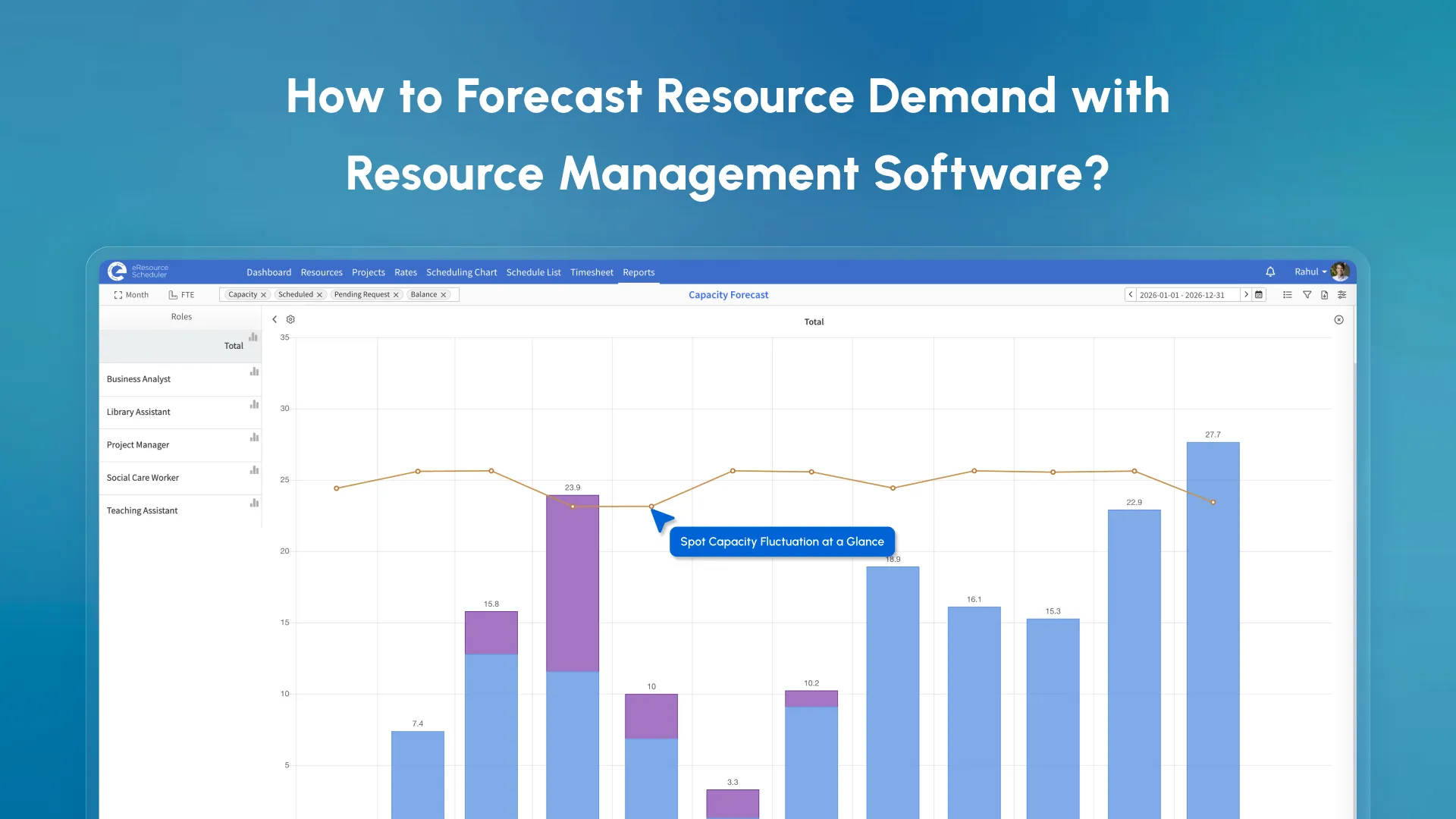
Resource demand forecasting involves getting a measure of people, skills, and hours your team will need to deliver upcoming projects before they begin. It is for project and resource managers who want to stop panicking at last-minute shortages and start planning around them.
Think of it in this way. Resource planning is deciding who will do what. Resource demand forecasting is working out whether you even have the right people on standby when the work arrives. One looks at today, the other plans for the future.
Has your team ever rushed to find a developer the week a project started, or burned out a top player because he was too overloaded and undernoticed? Then you already know why demand forecasting matters, and that’s the reason you are here.
The right resource capacity planning solution can be the difference between reacting to problems and preventing them. If you want to know how managing demands fits the bigger picture, our blog on indispensable role of demand management is a good place to start.
According to Wellingtone’s State of Project Management Report 2026, only 36% of organizations deliver projects on time. Nearly 2/3rd are already running late. Poor resource forecasting is one of the biggest contributors to this stat.
When you can see demand three months early, you have time to hire a contractor, redistribute work, or move a lower-priority project. When you cannot, you have to pay premium rates for emergency resource recruitment or risk burning out your best people to cover the gap.
Both are expensive, not only in dollars but also in minutes. An overloaded team member makes mistakes, misses deadlines, and, after a point, eventually quits. An underutilized resource is payroll that you are not getting any value from. He/She is a leech on your company’s time and money. Forecasting keeps you in the zone between the two.
You know in advance that your senior QA lead is booked when a new project needs her. You can now have an honest conversation with the client before you close the deal. This is far better than explaining a slipped deadline after it has happened and failing miserably.
Without a clear view into future needs, budgets are guesswork. Knowing which roles you will need, when you will need them, and at what capacity, grounds your financial planning in reality.
Before you act on any of this, you need to be clear on what you are actually measuring. Two terms, ‘resource demand’ and ‘resource capacity’, are often confused. This is the root cause of many forecasting mistakes.
These two terms get mixed up all the time. Confusing them leads to plans that look fine on paper, but it falls apart as soon as applied.
| Resource Demand | Resource Capacity | |
| What it means | The work that needs to be done: hours, roles, and skills required for your projects | How much your team can realistically deliver in a given period |
| What it includes | Project tasks, milestones, and required skill sets | Available hours after leave, existing bookings, and part-time contracts |
| Question it answers | "What do we need?" | "What do we have?" |
| Risk if ignored | Committing to work you cannot deliver | Overloading people or wasting capacity without realizing it |
Demand tells you what you need. Capacity tells you what you have.
Forecasting is the act of comparing the two. Far enough ahead that you can close any gaps before they become crises. A team that only tracks demand commits more than they can deliver. A team that only tracks capacity has no clue what is coming. You need both. Reviewed together regularly. With this clear, the next question arises…
You cannot forecast well with bad inputs. Here is what you will need before your numbers gain some meaning.
1. Your Project Pipeline: Which projects are confirmed? Which are 70%+ probable? Which are at the 50% mark? Even a rough project pipeline improves accuracy. If sales and delivery are not speaking for themselves, you are flying blind.
2. Current Resource Availability: Before taking any project, answer the following. Who is free? Who is partially booked? Who is on planned leave? Include not only the full-time staff but also part-timers and contractors.
3. Employee Skills and Roles: A project that needs two senior React developers cannot settle on two junior generalists. Your forecast must also take into account the skill level.
4. Historical Workload and Timesheet Data: Past utilization patterns reveal where demand spikes and how far your previous estimates were. Planned vs actual hours is your feedback.
For a deeper understanding of how it connects to delivery, resource forecasting in project management is worth a read.
5. Project Timelines and Priorities: Rigid deadlines need resources locked in earlier. Priority sequencing determines how demand is staged across your calendar.
Missing any one of these can throw off your forecast. Once you look at the full list, one thing becomes clear. Trying to manage all of it manually is where most teams start running into trouble.
Most teams start with spreadsheets. This works fine until it’s too late. Here is where each approach actually stands.
| What You Need to Do | Manual / Spreadsheets | Resource Management Software |
| Track who is available right now | Manual update required; often out of date | Live availability updated automatically |
| Filter by skill or role | Not possible without rebuilding formulas | Built-in filtering in seconds |
| See utilization across the team | Requires manual calculation per person | Automated utilization reports |
| Compare planned vs actual hours | Needs separate timesheet reconciliation | Tracked in one place |
| Adjust when a project timeline shifts | Every dependent row is updated by hand | Cascades automatically |
| Handle 5+ concurrent projects | Error-prone and slow | Designed for this complexity |
| Spot a resource gap 6 weeks out | Hard without dedicated analysis | Visible in the forecast view by default |
| Version control and team access | Risk of working from an old file | Single source of truth |
When your team crosses around 15-20 people managing five or more concurrent projects, spreadsheet forecasting costs more in overhead than it saves. Forecasting errors resulting in client escalations are another signal.
When managers have to spend more than 2-3 hours a week just maintaining the data, the tool itself has become the bottleneck. The table showed the ‘what’. The next section covers the ‘why’.
A spreadsheet shows you a snapshot of the resources. Forecasting requires a live, dynamic view of who is available, has required skills, and demands updates as things change. This is a difference in capability, not just convenience.
Research Extract:
Daniel Keleperas, in his thesis on EXPLORING
THE IMPORTANCE OF DEMAND FORECASTING IN B2B, states, “It can be argued that if a
company can master the data that can be derived from numerous sources to create a foresight of the future as
accurately as possible, then the company will no longer step on unknown grounds. It will minimize the
unforeseeable events of the future, make decision-making less stressful, with fewer surprises, and not rely
solely on hope or ungrounded assumptions and beliefs.”
Is your team managing schedules, capacity planning, skills, timesheets, and reports across multiple projects? A purpose-built tool will give you centralized visibility.
eResource Scheduler is an all-in-one resource management software that brings everything in one place. You can see everyone’s availability on a single view, filter by role or skill, and pull utilization reports without switching between tools. The end goal here is to stop spending hours maintaining a spreadsheet that is already out of date by the time you are finished.

Once the right system is in place, here is exactly how the forecasting processes work.
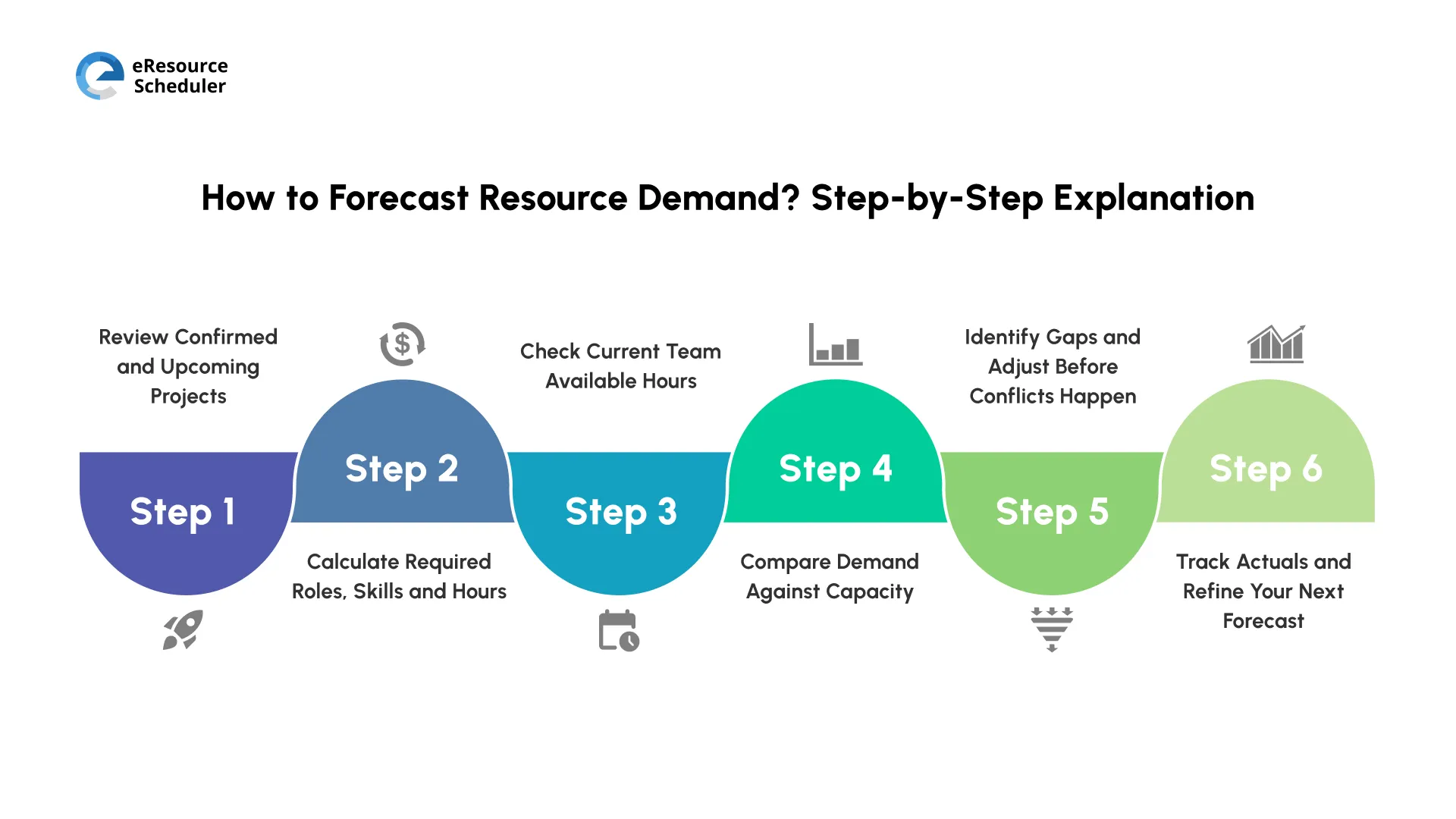
Resource demand forecasting works best when you break it into a repeatable planning process.
Step 1: Review Confirmed and Upcoming Projects
Start with your pipeline. Pull estimated start dates, project duration and rough scope. This is your demand signal.
Step 2: Calculate Required Roles, Skills and Hours
Break each project into 2 parts. Roles and approx hours per role per week. Use the past projects as your reference.
Step 3: Check Current Team Available Hours
Run an availability check for the forecast period. Take into account leaves, public holidays, commitments, and part-time schedules. Assumption is your worst enemy in this case.
Step 4: Compare Demand Against Capacity
Map required demand against available capacity by role and time period. Where client demand exceeds your supply is your red zone.
Step 5: Identify Gaps and Adjust Before Conflicts Happen
When you can see the gaps, you can choose your solution. Reschedule low-priority work. Bring in contractors. Redistribute Tasks. Flag risk and involve stakeholders.
Step 6: Track Actuals and Refine Your Next Forecast
Compare planned hours against actual data from timesheets. The gap will tell you how accurate your planning was and improve forecast accuracy over time.
Did You Know?
According to the PMI’s
Global Project Management Talent Gap Report (2025), up to 30 million new project
professionals will be needed by 2035. Knowing your demand gaps in advance will be your best defence in such
cases.
Even when you have a solid process, a few common mistakes quietly damage forecasting. Knowing them in advance saves a lot of time.
Resource management is one of the hardest processes to implement in any organization. Yet it is the only one that drives great returns when done well. Most teams know this. Very few apply it consistently.
Many forecasting problems start long before deadlines are missed or workloads become unmanageable. Avoiding the following mistakes helps teams keep forecasts realistic and actionable.
Forecasting resource demand is not a luxury for large companies. It is the practice that separates teams who are consistently delivering. The teams beating the average delivery timeline are not lucky. They are forecasting earlier, adjusting faster, and using better data.
Know your timeline. Know your capacity. Compare the two and catch the gaps early. What makes it hard is
doing this consistently, with live data, across multiple projects and growing teams. This is where eResource Scheduler earns its place. Not as a magical solution. But as the
system that makes this consistent practice achievable.

1. What Is Resource Demand Forecasting Software?
Resource demand forecasting software helps you estimate how many people and hours you will need for future projects. It shows upcoming work and compares it with your team’s available capacity. This helps you spot shortages early and plan with more confidence.
2. What should I look for when considering resource forecasting software?
Prioritize five factors when looking for resource forecasting software. Live availability tracking. Skill-based filtering. Planned vs actual hour comparison. Utilization reporting. Integration with existing workflow.
3. How does resource demand forecasting affect project profitability?
Accurate forecasting means staffing projects at the right level without over-hiring or burning out your team. This keeps labor costs predictable, reduces emergency contractor spending, and protects your margins from resource-driven overruns that catch most teams off guard.
4. How often should we update our resource forecast?
A forecast that only gets reviewed monthly is almost always already wrong by the time you open it. The best period is weekly or bi-weekly for most teams. Exceptional cases would be when a new project is confirmed, a key team member’s availability changes, or a project timeline moves.
5. Can resource forecasting help us make better hiring decisions?
Yes. When your forecast continuously shows the same roles in short supply, it is your signal to hire ahead of time. It turns hiring from a last-minute firefighting ritual into a planned investment with data to back the headcount request.

Plan Smarter. Schedule Faster. For Free.
Join thousands already using eResource Scheduler to align teams, time, and tasks seamlessly.
 ALL FEATURES INCLUDED