You cannot plan for every curveball your business will face this year. But you can plan how you will react when one knocks at your door.
This is the main idea behind scenario planning, and it is also the reason why more managers are leaning on it. If you have ever sat in a meeting wondering, ‘What happens if we win this huge project we are not fully staffed for?’ You have already done the scenario planning in your head. The difference is that doing it properly, with the right structure and a bit of help from resource capacity planning software, turns this gut feeling into something you can act on.
Once you can spot a scenario for what it is, the harder part is building a habit around it. This starts with understanding what scenario planning is doing for you.
Scenario planning is simply the habit of mapping out several possible features for your business. Instead of betting everything on one forecast, you look at a handful of realistic situations. You think through how each one would play out, and decide ahead of time how you’d respond.
Most teams don’t do this. They set a target, build a plan around it, and hope reality cooperates. It usually doesn’t. Maybe you land more clients than expected. Maybe two key people leave in the same quarter. Maybe a project you thought was straightforward turns into a resource nightmare halfway through.
Scenario planning flips the approach. Instead of asking ‘What do we expect to happen?’, you ask ‘What could happen, and are we ready for it?’ You’re not trying to predict the future with certainty. You are building a few playbooks, so whichever version of the future shows up, you are not starting from scratch.
This mindset matters more when your team spans multiple locations, time zones, or departments. This is where a huge amount of complexity in workplaces emerges.
When something changes, whether it is a shift in company direction or a client suddenly doubling their scope, you need a workforce that can flex with it. Scenario planning gives you this flexibility because you have already gone through the moves before you are forced to make them under pressure.
Here is what it actually does for you. It forces you to look honestly at where your team is strong and where it is stretched thin. Then it lets you build contingency plans in advance rather than improvising when a project takes an unexpected turn. Lastly, it helps you weigh trade-offs by comparing a few solid options. Over time, it trains you to think a step ahead so you start spotting shifts in workload or demand before they become emergencies.
None of this requires guesswork. It requires having a clear picture of your people, their availability, and their skills. Exactly the kind of visibility that trips most teams up.
Pini Group, a multidisciplinary engineering and consulting firm, ran into this exact wall. Leadership could see the projects coming in. But they had no reliable way to anticipate demand or make proactive staffing calls before problems surfaced. Once they brought their scheduling onto eResource Scheduler, Pini Group closed its scheduling gaps. The software gave managers a real-time view of utilization across offices, letting them reallocate staff the moment priorities shifted and prepare teams for what was coming next, not reacting when it had arrived.

Knowing the benefits is one thing. Actually pulling this off when your projects and people are tangled together in reality is a different story.
Scenario planning sounds clean on a whiteboard. In a real services business, it gets messy fast, mostly because your projects and your people are never isolated from each other.
Say one project manager decides to change their project deliverables. This single decision can ripple through two or three other projects that were quietly depending on the same specialists. Or maybe someone on a critical project gets sick, or resigns, with zero warning. These are not rare events. They are the normal texture of running a team, and they can knock several projects off course at once.
Then there is the opposite problem, the good kind of chaos. You bid on six projects, hoping to land two, and you win five. This is a great sales quarter and a staffing headache in the same breath. Who is covering all of it? When can you realistically bring in the people you need? These are the exact questions scenario planning answers.
This is really why people sometimes call it ‘what if’ planning. You are constantly asking what happens (to revenue, to your team’s workload, to your delivery timelines) if a particular scenario plays out.
| Scenario | What It Impacts |
| You win more projects than planned | Staffing capacity, delivery timelines, and need for contract help |
| A key team member leaves mid-project | Project continuity, handover time, and client confidence |
| A client doubles their project scope | Budget, resource allocation, and team workload |
| A bid you expected to lose wins | Onboarding speed, hiring urgency, and revenue recognition |
Once you can see these scenarios laid out like this, the next question is obvious. How do you actually get ahead of them instead of reacting after the fact?
This is where a global workforce planning tool earns its keep. Its whole job is to give you the visibility and structure you need to plan for both the situations you expect and the ones you do not.
Think of it less as software that predicts your future and more as a system that makes your existing data usable. It shows you where your skill gaps are, how your team’s capacity looks across the next few weeks, and what your options are if a scenario suddenly shifts from hypothetical to real.
On an ordinary day, this tool is doing quieter, less glamorous work. It is tracking who is assigned to what. Flagging when someone is overloaded. Keeping a live picture of your team’s availability instead of a spreadsheet that is already outdated by Tuesday.
It also takes over the repetitive planning tasks that eat up your week. Things like cross-checking availability before assigning new work, and manually comparing the team’s capacity against upcoming project timelines. If half your team works from job sites rather than a desk, this same visibility needs to follow them. This is exactly why checking capacity through a mobile app to improve utilization matters just as much as checking it from your laptop.
A project manager assigns work and builds out linked project timelines. Both the manager and the team can track progress against the plan in real time. From here, you can use this same data to look ahead. You can anticipate the upcoming workload, estimate how many people you will need for what is coming, and make scheduling calls based on facts.
Michel David, a project manager who uses eResource Scheduler, put it simply in a client review. The software helped his team end recurring staffing headaches, letting them plan several weeks with confidence. They were no longer catching problems after delays had happened.
Seeing how the tool works in a single moment is useful. But scenario planning is not a one-time exercise. It only works if you build it into an ongoing process.
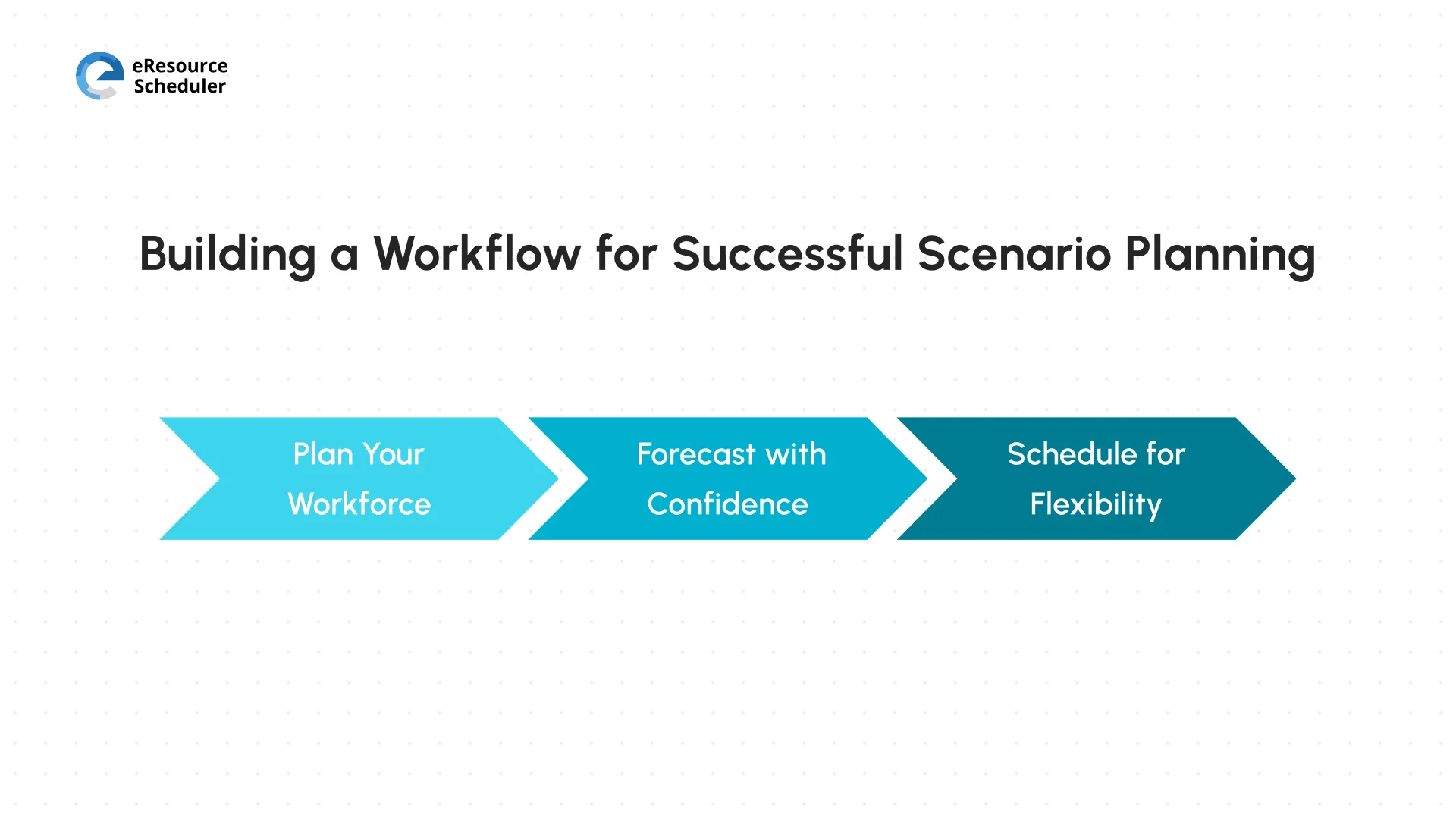
Getting scenario planning right isn’t about running one big analysis and calling it a game. It is a workflow with three connected parts. Here is how each piece fits together.
Start with your organization’s goals, not a generic wishlist. Get clear on where the business is headed so your workforce planning lines up with what leadership is actually trying to accomplish.
From there, take an honest look at your current team. What skills do you have? Where is performance strong? Where are the gaps that would slow you down if demand picked up tomorrow? Once you know this, think ahead to what your future workforce needs to look like, factoring in growth plans, industry shifts, and any new skills your clients are starting to expect.
Compare where you are now against where you need to be, and you will usually find a few clear gaps. Decide how you will close them. Will you hire, upskill your current team, bring in contractors, or incorporate a global workforce planning tool to handle coordination? Keep tracking performance against your goals as you go. Revisit the plan regularly rather than setting it once a year and forgetting about it.
This is also where it helps to know exactly who is part of your core team and who is brought on for a specific stretch of work. The two show up very differently when you are comparing cost against capacity. Getting clear on part-time and full-time resources early keeps this comparison honest instead of a guessing game.
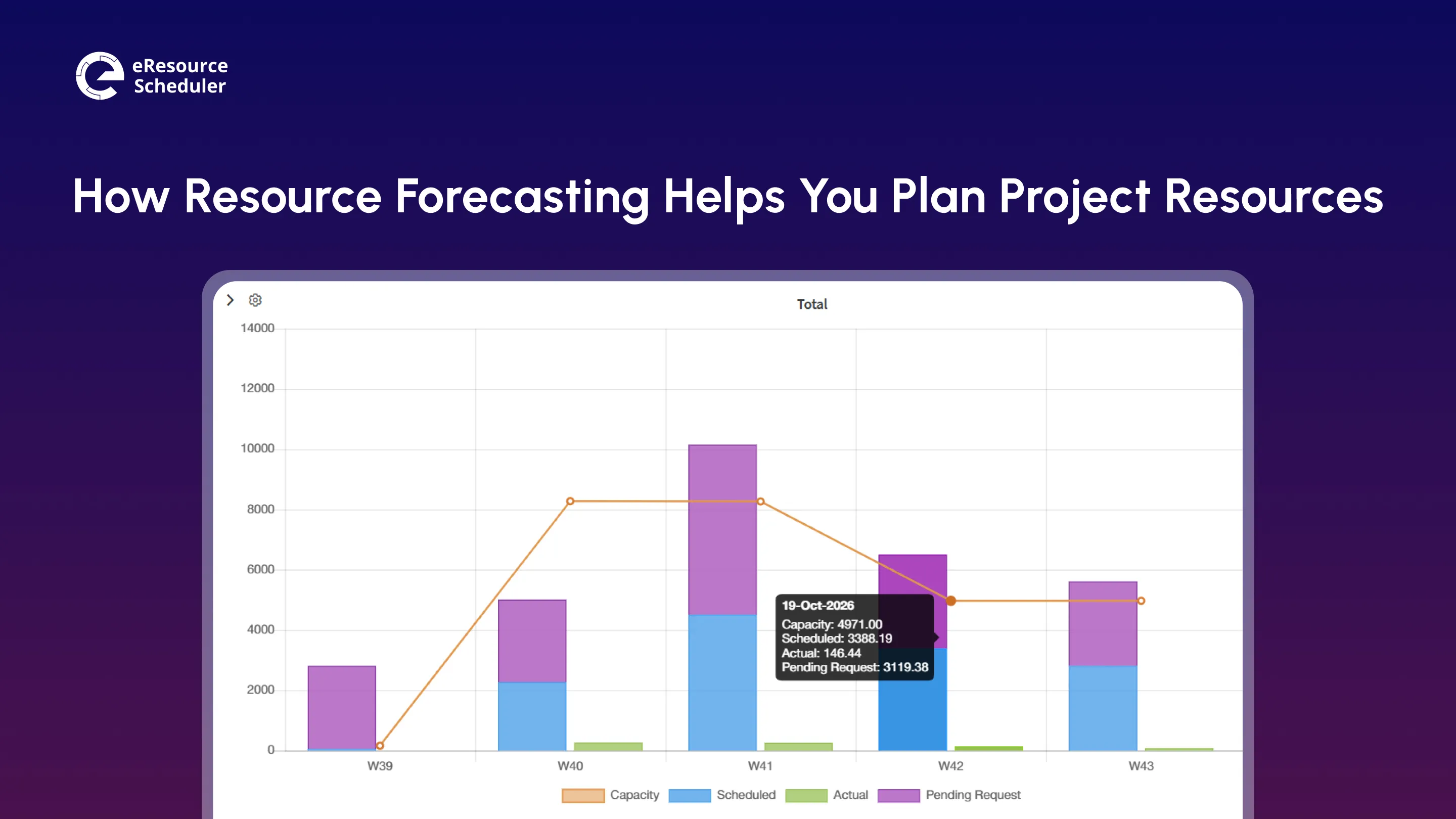
Forecasting exists to help you hit your service levels without blowing your budget on staffing you do not need. It starts with your current data. Look at what is happening on your active projects and estimate realistically how many people you will need for what is coming next.
You also need balance. As a project lead, you are responsible for each project having the right number of people. Overstaffing leads to budget waste. Understaffing burns out the people you already have. Aim for forecast accuracy by measuring your estimates against what actually happens. Adjust your approach when you notice a pattern of being consistently over or under the range.
Build room for the unexpected, too. Conditions change quickly, sometimes for reasons nobody could have predicted. A forecast that assumes everything will go according to plan is not really a forecast at all.
Once you know roughly what is coming, scheduling is where the plan actually becomes real. A good schedule gets the most out of your team without demanding more from them than they can reasonably give.
Make sure your team is available when it actually matters most. During your peak hours or busiest project phases. If people are consistently working through these high-pressure windows, it is worth considering how you recognize the effort. Account for hours that do not appear in a project timeline (breaks, meetings, and admin work), because ignoring them only makes your project inaccurate. Whatever project scheduling techniques you lean on, the fundamentals stay the same. Match effort to real capacity, not how the calendar looks on paper.
When someone has downtime between projects, give them something useful to work on rather than letting the gap stay empty.
| Scheduling Practice | Why It Matters |
| Prioritize coverage during peak hours | Keeps critical work moving when it matters most. |
| Account for non-productive hours | Makes your schedule realistic instead of optimistic. |
| Build in backups for key roles | Protects you when someone is unexpectedly unavailable. |
| Stay flexible around leaves and holidays | Avoids last-minute scrambling. |
| Watch for overwork | Protects both output and your team's well-being. |
Flexibility matters too. Build your schedule around leaves, public holidays, and slow patches instead of an idealized calendar. Always keep a backup plan ready because the one thing scenario planning teaches you is ‘Expect the Unexpected’.
Scenario planning is not a project you finish on time and move on. It works because you keep coming back to it. Checking your assumptions against what’s actually happening, and adjusting as your team and workload evolve.
This means revisiting your scenarios regularly. Not just when something goes wrong. Keep an eye on the metrics that tell you:
If these numbers start drifting, this is your signal to revisit the plan before it becomes a bigger problem. When you build scenario planning into your team’s rhythm, back it up with workforce management practices to make it stick.
Part of your challenge is knowing who has which skill before a scenario hits. A proper skills inventory makes this gap analysis far less painful. Now you are not scrambling to remember who can step into what role when plans change.
At the end of the day, scenario planning is really just structured preparation. You are not trying to guess the future. You are making sure that whichever version of the future shows up, you have already thought through your options rather than reacting in a panic.
Start small if you need to. Pick two or three realistic scenarios your team is likely to face this year. Map out how you’d handle each one. Build the habit of revisiting them. Over time, this habit, backed by a clear view of your team’s capacity through workforce management software, becomes less about predicting chaos and more about simply not being surprised by it.

Plan Smarter. Schedule Faster. For Free.
Join thousands already using eResource Scheduler to align teams, time, and tasks seamlessly.
 ALL FEATURES INCLUDED