
Free Trial


MAIN FEATURES

- Schedule & Plan Multiple Resource Types
- Collaborative: Real-time data sharing
- Configurable to suite your requirements
- Drag & Drop scheduling
- Timesheet to capture actuals
- Utilization, Forecasting & Financial Reports


Feature List of our resource management software.

TOUR VIDEO

Watch 5 minute tour video of our resource scheduler.

Resource Scheduling Software - Tour Video
 

Watch Detailed Tour of our resource management tool.

PERSONAL WEB DEMO

Let one of our experts give you an obligation free personal web demo of our resource planner.

Resource Management Software Demo

Web demo takes 30 minutes & provides complete overview of our resource scheduling software.


Request Web Demo of our resource planning software.


#1 Software for Resource Scheduling, Planning & Management

Ensure Project Success by Efficiently Planning, Scheduling & Managing Resources

Enbraun’s eResource Scheduler (eRS) is  multi-user resource scheduling, planning & management software. Its collaborative architecture facilitates efficient sharing & planning of project resources in real time. Flexible & scalable design makes our resource management software suitable for all organizations irrespective of size and industry and configurable groupings allow our resource planning software to fit around any organization’s structure & management requirements.

Cutting edge features like drag n drop scheduling, configurable reports, export to excel, collaborative architecture, high level of configurability all combined together make our resource management tool popular among managers who need to schedule, plan & manage resource on a regular basis.

Highly Configurable Scheduling Tool

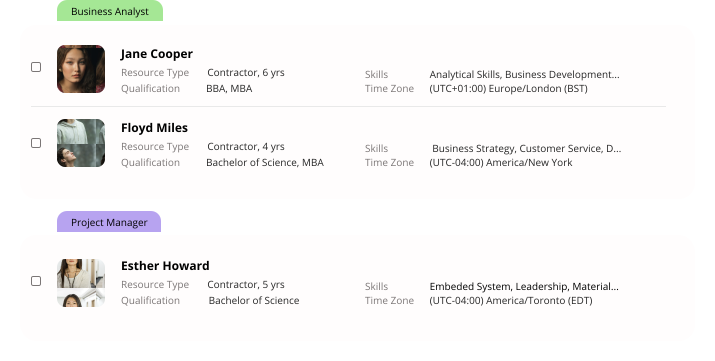
Resource Screen - Resource Scheduling SoftwareeRS resource scheduler tool is very flexible and can be easily configured for managing multiple resource types (e.g. employees, vehicles, meeting rooms, equipment etc.). Every resource type can have multiple custom attributes which allows proper profiling and ultimately leads to easy identification & efficient project resource scheduling. eRS also allows setting-up multiple working calendars to support unique working patterns and facilitates configuring custom roles, teams, departments, offices etc. All this flexibility ultimately assists in configuring our resource scheduling software to fit around your organization’s structure & scheduling requirements.

Drag & Drop Scheduling

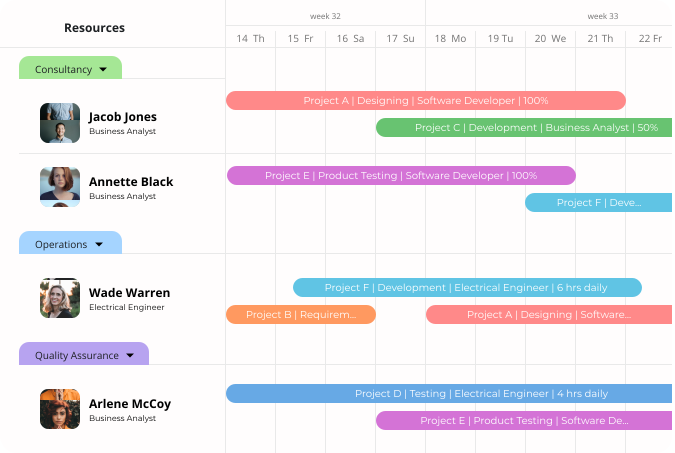
Scheduling Chart - Resource Planning Program eRS resource planning program offers powerful scheduling & planning chart. Filters helps in identifying right resources on the basis of custom defined attributes e.g. roles, skills, team etc. and once identified, resources can be easily scheduled against projects by a simple drag & drop, this feature helps to create and modify bookings with a simple click and makes planning easy and efficient. Scheduling chart of our resource planner system displays existing bookings in calendar view, which makes scheduling data easy to understand and work with. These features make scheduling chart of our resource planning tool extremely easy and powerful.

Timesheet for Realistic Management

Timesheet - Project Resource Management Software Our resource management software offers user friendly timesheet module that helps in capturing actual time spent on different projects. Our resource management tool allows flexible time entry along with the facility to enter comments for every time entry, this helps in accurate and efficient time tracking. Timesheet is offered in weekly, fortnightly, monthly as well as user defined custom formats. Colour coding helps in easily identifying submitted, approved and rejected entries. Timesheet data facilitates reporting on actual utilization / availability and provides cost & revenue data which are reflected in different reports offered by our resource management application.

Utilization Report for Balanced Scheduling

Utilization Report – Resource Scheduling Software eRS scheduling tool provides informative and meaningful data about resource utilization & availability. Our scheduling application reports on planned as well as actual utilization at different levels i.e. team, office, project etc. Report can be analysed in different units (days, hours & percentage) and views (daily, weekly, monthly etc). Reports in our scheduling application are equipped with rich & informative graphs, user defined color coding, filters & multiple organizing options. Utilization report increases productivity and ensures optimum utilization by making management data easy to understand & analyze.

Forecasting Report for Accurate Resource Planning

Forecasting - Resource Planning Software eRS resource planning software offers informative forecasting report that proves extremely useful if your organisation believes in preparing schedules in advance. Forecasting report provided by our resource planning program compares capacity v/s demand and accurately forecasts shortages & excess at different levels i.e. role, office etc. Configurability principle of our resource planning program also applies to this report, as it offers rich graphs, color coding, filters & multiple organize by options. User can easily change units and filter & organize data for better understanding and management. These features make forecasting report of our resource planning tool useful in short, medium and long term.

Financial Report for Profitable Resource Management

Financial Report - Resource Management TooleRS resource management application offers financial report that highlights financial impact of scheduling / planning resources on projects. Financial report accurately provides sensitive but valuable data, such as planned v/s actual cost, planned v/s actual revenue, planned v/s actual profit etc. Financial report compares cost, revenue & profitability across resources & projects and helps in project prioritization. Data in this report can be viewed at different levels i.e. project, team, manager etc. Same as other reports, this report also offers rich & informative graphs, filters and multiple organize by options. Financial report proves to be very useful in the hands of proactive managers and can have positive impact on any organization’s bottom line.

Multi-user Resource Scheduling, Planning & Management Software